

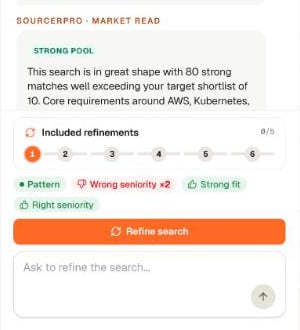
The chips row and the Refine search button, fixed above the chat box
Refine from your own reviews
Mark people Yes, Maybe or No in the list, and add a reason where you can. See Calibrating results. Then click Refine search. The button sits above the chat box and stays there, so it never scrolls away with the conversation. It is the one button for refining from your reviews.- Before your first review the button is dimmed and cannot be clicked. Hover it to see what to do: mark people Yes, Maybe or No, or type what to change.
- Text in the chat box rides along. If you typed something, the refinement follows your reviews and your words together.
- Hover the button to see how many included refinements you have left.
What the next refinement is based on
Above the button, one row of chips shows what the Sourcer will use. You see it before you click.- The first chip is the status. Hover it for a short explanation.
- Green chips with a thumbs-up show the reasons you gave on Yes.
- Red chips with a thumbs-down show the reasons you gave on No.
- A number after a reason, like ×3, means three people got that reason.
- Counts like “3 Yes” or “2 No” show instead when you gave no reasons.
- A grey chip with a speech bubble shows the start of the text you typed.
When you have only one or two reviews, the Refine search button turns from solid to outlined. It still works. It tells you the basis is thin.
Suggestions
The Sourcer also proposes concrete changes based on what it found, for example “Focus on Kundendiensttechniker” or “Include Facility Management”. Tick what fits and press Send: the refined run starts with those constraints applied.Type what to change
Anything you would say to a researcher, you can type into Ask to refine the search…: widen the radius, drop an industry, weigh certifications higher. Press Send to start a refined run on the same brief. This works with or without reviews.After you refine
The refined list opens in three groups: New (people the refinement found), Your picks (people you marked Yes) and Already reviewed. A small note counts people you rejected earlier who turned up again.How many refinements you have
Each search includes five refinements. Each one is a refinement, not a new verified search. After the fifth, the panel says Five refinements complete, and a new search uses one of your monthly searches. See Verified searches and data credits.The market read
Every search comes with an honest read of the pool: how strong it is, where the talent sits, and whether you can go straight to screening. A thin pool is stated as a thin pool, which is exactly what you want to know before you promise a client numbers. See Understanding the market read.Reasons that repeat become rules for the next search. A reason given once counts as an example. So give the same reason the same way each time, for example “Wrong industry”.