

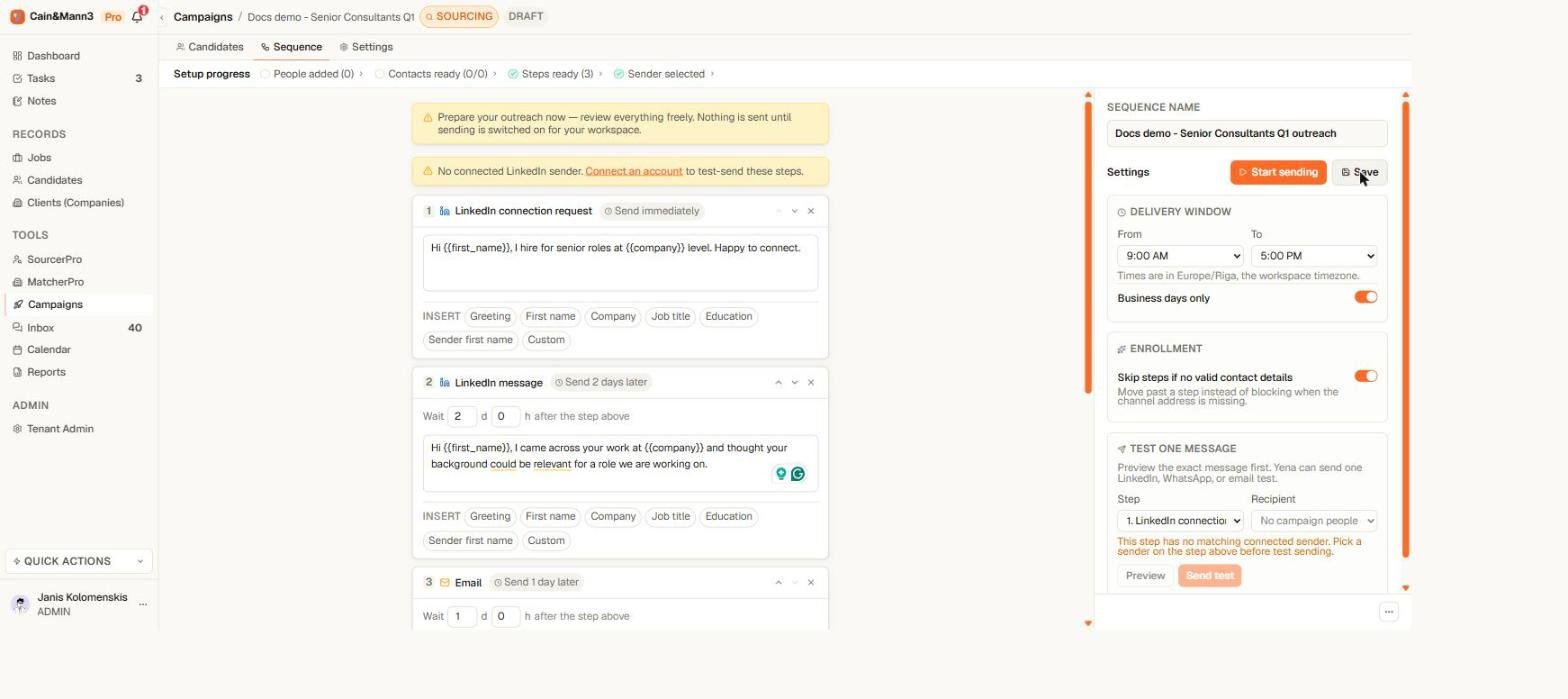
Each step header reads as a sentence: send immediately, or send days later
Step types
Timing
Each step header states its timing in plain words: Send immediately or Send 3 days later. Open the step to change the days and hours. The delay counts from the previous step. For a LinkedIn message that follows a connection request, it counts from acceptance — so “2 days later” means two days after they accepted, however long the invite sat unanswered.Personalization
Insert fields anywhere in a subject or body. There are exactly six: First name, Last name, Formal salutation (German), Company, Job title, and Sender first name. The formal salutation renders as “Sehr geehrter Herr Müller” or “Sehr geehrte Frau Weber” when the person’s gender and surname are known, and as “Guten Tag Anna Weber” otherwise. Before launching, use Test one message to see a real rendered result for a real recipient. A field that Yena cannot fill never leaves the building. If a message still contains a placeholder at send time, whether a typo in curly braces or a field the recipient’s record does not have, the step is held, and the test preview points at the placeholder in plain words so you can remove it or pick a field from the list. Nobody ever receives a message with braces in it.Rules the editor enforces
- One sequence per campaign, one connection request per sequence. More than one invite to the same person reads as spam — to the recipient and to LinkedIn.
- Email steps need a subject and a body; LinkedIn messages need a body. The readiness check names any step that is incomplete.
- Every step needs a sender it can use. Each sending step is tied to one of your connected accounts; the readiness check flags any step without one.
- Sending on means editing off. While sending is on, the sequence is read-only. Pause first, edit, preview, then resume — people mid-journey continue safely on the updated definition.
Templates
The sequence editor includes ready-made templates named by what they send and whom they reach:- Candidate outreach (shown in English or in formal German, matching your interface language): a LinkedIn connection request, then three emails and two LinkedIn messages over about two weeks. If the request is not accepted within 7 days, the sequence moves on by email. Any reply stops it. This is the same sequence a job generates in one click; see Start a campaign from a job.
- Message to people you can already message: two LinkedIn messages and no connection request. Reaches only people already connected to you; everyone else is skipped. Applying it sets the sequence to People you can already message for you.
- Email intro + follow-up: two automated emails for people who have an email address.
Waiting for a connection, withdrawing a request
A LinkedIn message that follows a connection request waits for the person to accept. Each request step carries its own waiting time, counted from the day the request was sent: 7 days in generated sequences, 14 days in sequences built before this rule existed. When the time runs out the message steps are skipped and the person continues with any email steps. Requests nobody answers are withdrawn after 30 days so they do not pile up on your LinkedIn account. Change the number of days, or turn withdrawing off, in the sequence settings. Sequences created before this setting existed keep 21 days until you change them.Missing contact details
A person without an email address cannot receive an email step; a person without a LinkedIn profile cannot receive LinkedIn steps. In the sequence settings you decide what happens:- Skip — the person skips that step and continues with the rest of their journey.
- Hold — the person waits until you add the missing detail.