Invite teammates and candidates by name, instead of copying addresses out of a record.
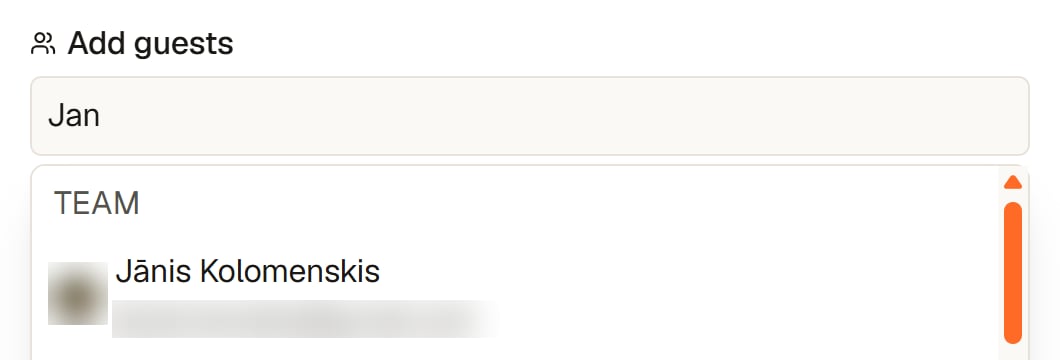
Almost every interview invite goes to two kinds of people: someone on your team, and the candidate. Both are already in Yena, so neither should need an address copied across from another tab.Type a few letters of a name into the guest field of an event. The suggestions arrive in two groups:
Team: the people in your workspace.
Candidates: the people in your database.
Pick the one you mean and the invitation carries the right address.
Pick a teammate by name
An outside address still works. A client’s interviewer, for example, can be typed in full as usual.
Picking from the list also protects the spelling. A mistyped address fails quietly, and you find out when the candidate does not show up.
{"docsConfig":{"theme":"maple","$schema":"https://mintlify.com/docs.json","name":"Yena Help Center","description":"How to source, shortlist, and place with Yena.","colors":{"primary":"#FF4C00","light":"#FF6A2B","dark":"#E04300"},"logo":{"light":"https://mintcdn.com/yena/syYzOb4jHO7iuYSP/images/logo.png?fit=max\u0026auto=format\u0026n=syYzOb4jHO7iuYSP\u0026q=85\u0026s=80958bb66a092de311e3caaadc0354a4","dark":"https://mintcdn.com/yena/syYzOb4jHO7iuYSP/images/yena-icon-white.svg?fit=max\u0026auto=format\u0026n=syYzOb4jHO7iuYSP\u0026q=85\u0026s=8bc4814e47db83c354db7c7f0af1e420"},"favicon":"https://mintcdn.com/yena/syYzOb4jHO7iuYSP/favicon.ico?fit=max\u0026auto=format\u0026n=syYzOb4jHO7iuYSP\u0026q=85\u0026s=24b306bf9b37bcbdb150fc1d47d97d22","appearance":{"default":"light"},"navbar":{"links":[{"href":"https://www.yena.ai/contact","label":"Contact"}],"primary":{"type":"button","label":"Open Yena","href":"https://my.yena.ai"}},"footer":{"socials":{"website":"https://www.yena.ai","linkedin":"https://www.linkedin.com/company/yena-ai"}},"seo":{"indexing":"navigable"},"integrations":{"posthog":{"apiKey":"phc_thrMVo9rYrhvYUXRnBZDxtSWz66aTSmnKR9BKzEUizt2"}},"styling":{"latex":false},"navigation":{"languages":[{"language":"de","href":"de"},{"language":"en","href":"en"}]}},"deployment":{"deploymentMetadataValue":{"subdomain":"yena","hasAudioNarration":false,"actualSubdomain":"yena","customDomains":["support.yena.ai"],"gitSource":{"type":"github","owner":"janiswotra","repo":"yena-docs","deployBranch":"main","contentDirectory":"","isPrivate":true,"mountPath":"","label":""},"chroma":{"collectionId":"50ceaaf0-877e-411b-8868-e1fb31f0b9c8","liveDeploymentHistoryId":"6ae0bce12ea1296893ead779","schemaVersion":"v3","latestBuiltDeploymentHistoryId":"6ae0bce12ea1296893ead779"},"entitlements":{"AI_CHAT":{"status":"DISABLED"}},"buildId":"6ae0bce12ea1296893ead779","clientVersion":"0.0.4005","searchFilterCounts":[{"language":"de","tag":"Pipeline \u0026 CRM","count":12},{"language":"de","tag":"Der Sourcer","count":12},{"language":"en","tag":"Pipeline \u0026 CRM","count":12},{"language":"en","tag":"The Sourcer","count":12},{"language":"de","tag":"Erste Schritte","count":10},{"language":"de","tag":"Arbeitsbereich","count":10},{"language":"en","tag":"Getting Started","count":10},{"language":"en","tag":"Workspace","count":10},{"language":"de","tag":"Karriereseite","count":9},{"language":"de","tag":"Leitfäden","count":9},{"language":"en","tag":"Career Page","count":9},{"language":"en","tag":"Guides","count":9},{"language":"de","tag":"Kampagnen","count":8},{"language":"en","tag":"Campaigns","count":8},{"language":"de","tag":"Kundenportal","count":7},{"language":"en","tag":"Client Portal","count":7},{"language":"de","tag":"Datenschutz \u0026 DSGVO","count":3},{"language":"en","tag":"Privacy \u0026 GDPR","count":3},{"language":"de","tag":"Integrationen","count":2},{"language":"en","tag":"Integrations","count":2}]},"assistantConfig":{"enableAskAiButton":false,"enableStarterQuestions":false,"enableContextualStarterQuestions":false,"enableAskAiSearchBar":true},"basePath":"","hasChatPermissions":false,"hasWebMcpPermissions":false,"toggles":[{"name":"kill-isr","enabled":true,"variant":{"name":"disabled","enabled":false,"feature_enabled":true},"impressionData":false},{"name":"agent-mintlify-slack","enabled":true,"variant":{"name":"disabled","enabled":false,"feature_enabled":true},"impressionData":false},{"name":"editor-v7-file-tree","enabled":true,"variant":{"name":"disabled","enabled":false,"feature_enabled":true},"impressionData":false},{"name":"agent-integrations-settings","enabled":true,"variant":{"name":"disabled","enabled":false,"feature_enabled":true},"impressionData":false},{"name":"automations-pr-grouping","enabled":true,"variant":{"name":"disabled","enabled":false,"feature_enabled":true},"impressionData":false},{"name":"custom-prefix","enabled":true,"variant":{"name":"disabled","enabled":false,"feature_enabled":true},"impressionData":false},{"name":"analytics-v7","enabled":true,"variant":{"name":"disabled","enabled":false,"feature_enabled":true},"impressionData":false},{"name":"user-flows-analytics","enabled":true,"variant":{"name":"disabled","enabled":false,"feature_enabled":true},"impressionData":false},{"name":"no-publish-flow","enabled":true,"variant":{"name":"disabled","enabled":false,"feature_enabled":true},"impressionData":false},{"name":"workos-onboarding","enabled":true,"variant":{"name":"disabled","enabled":false,"feature_enabled":true},"impressionData":false},{"name":"llms-txt-v2","enabled":true,"variant":{"name":"disabled","enabled":false,"feature_enabled":true},"impressionData":false},{"name":"pause-universal-search-reconcile","enabled":true,"variant":{"name":"disabled","enabled":false,"feature_enabled":true},"impressionData":false},{"name":"snapshot-serving-live","enabled":true,"variant":{"name":"disabled","enabled":false,"feature_enabled":true},"impressionData":false},{"name":"stripTemperatureMiddleware","enabled":true,"variant":{"name":"disabled","enabled":false,"feature_enabled":true},"impressionData":false},{"name":"per-site-search-delta","enabled":true,"variant":{"name":"disabled","enabled":false,"feature_enabled":true},"impressionData":false},{"name":"support-platform-pylon-zendesk","enabled":true,"variant":{"name":"disabled","enabled":false,"feature_enabled":true},"impressionData":false},{"name":"snapshot-serving","enabled":true,"variant":{"name":"disabled","enabled":false,"feature_enabled":true},"impressionData":false},{"name":"instant-rollback","enabled":true,"variant":{"name":"disabled","enabled":false,"feature_enabled":true},"impressionData":false},{"name":"granular-notifications-server","enabled":true,"variant":{"name":"disabled","enabled":false,"feature_enabled":true},"impressionData":false},{"name":"granular-notifications","enabled":true,"variant":{"name":"disabled","enabled":false,"feature_enabled":true},"impressionData":false},{"name":"editor-private-page-search","enabled":true,"variant":{"name":"disabled","enabled":false,"feature_enabled":true},"impressionData":false},{"name":"automations-fable","enabled":true,"variant":{"name":"disabled","enabled":false,"feature_enabled":true},"impressionData":false},{"name":"fixed-ai-action-pricing","enabled":true,"variant":{"name":"disabled","enabled":false,"feature_enabled":true},"impressionData":false},{"name":"automation-resolve-merge-conflict","enabled":true,"variant":{"name":"disabled","enabled":false,"feature_enabled":true},"impressionData":false},{"name":"scoped-publishing","enabled":true,"variant":{"name":"disabled","enabled":false,"feature_enabled":true},"impressionData":false},{"name":"mintql","enabled":true,"variant":{"name":"disabled","enabled":false,"feature_enabled":true},"impressionData":false},{"name":"page-level-analytics","enabled":true,"variant":{"name":"disabled","enabled":false,"feature_enabled":true},"impressionData":false},{"name":"editor-version-history-v2","enabled":true,"variant":{"name":"disabled","enabled":false,"feature_enabled":true},"impressionData":false},{"name":"editor-nav-generations","enabled":true,"variant":{"name":"disabled","enabled":false,"feature_enabled":true},"impressionData":false},{"name":"billing-page-v2","enabled":true,"variant":{"name":"disabled","enabled":false,"feature_enabled":true},"impressionData":false},{"name":"workspace-projects","enabled":true,"variant":{"name":"disabled","enabled":false,"feature_enabled":true},"impressionData":false},{"name":"assistant-v5","enabled":true,"variant":{"name":"disabled","enabled":false,"feature_enabled":true},"impressionData":false},{"name":"byok-sep-25","enabled":true,"variant":{"name":"disabled","enabled":false,"feature_enabled":true},"impressionData":false},{"name":"fork-pr-previews","enabled":true,"variant":{"name":"disabled","enabled":false,"feature_enabled":true},"impressionData":false},{"name":"revalidation-jwt","enabled":true,"variant":{"name":"disabled","enabled":false,"feature_enabled":true},"impressionData":false},{"name":"vite-origin","enabled":true,"variant":{"name":"disabled","enabled":false,"feature_enabled":true},"impressionData":false},{"name":"editor-agent-model-picker","enabled":true,"variant":{"name":"disabled","enabled":false,"feature_enabled":true},"impressionData":false},{"name":"billing-updated-9-15","enabled":true,"variant":{"name":"disabled","enabled":false,"feature_enabled":true},"impressionData":false},{"name":"workos-sso-scim","enabled":true,"variant":{"name":"disabled","enabled":false,"feature_enabled":true},"impressionData":false},{"name":"hobby-abuse-scan","enabled":true,"variant":{"name":"disabled","enabled":false,"feature_enabled":true},"impressionData":false},{"name":"dashboard-inbox","enabled":true,"variant":{"name":"disabled","enabled":false,"feature_enabled":true},"impressionData":false},{"name":"workos-signup","enabled":true,"variant":{"name":"disabled","enabled":false,"feature_enabled":true},"impressionData":false},{"name":"workos-enabled","enabled":true,"variant":{"name":"disabled","enabled":false,"feature_enabled":true},"impressionData":false}],"googleFontsInlined":false},"customCss":[],"page":{"pagePath":"en/workspace/calendar-guests","slug":"/en/workspace/calendar-guests","pageMetadata":{"title":"Adding guests to a meeting","sidebarTitle":"Calendar guests","description":"Invite teammates and candidates by name, instead of copying addresses out of a record.","href":"/en/workspace/calendar-guests"},"description":{"compiledSource":"\"use strict\";\nconst {jsx: _jsx} = arguments[0];\nconst {useMDXComponents: _provideComponents} = arguments[0];\nfunction _createMdxContent(props) {\n const _components = {\n p: \"p\",\n ..._provideComponents(),\n ...props.components\n };\n return _jsx(_components.p, {\n children: \"Invite teammates and candidates by name, instead of copying addresses out of a record.\"\n });\n}\nfunction MDXContent(props = {}) {\n const {wrapper: MDXLayout} = {\n ..._provideComponents(),\n ...props.components\n };\n return MDXLayout ? _jsx(MDXLayout, {\n ...props,\n children: _jsx(_createMdxContent, {\n ...props\n })\n }) : _createMdxContent(props);\n}\nreturn {\n default: MDXContent\n};\n","frontmatter":{},"scope":{}},"pageType":"default","mdx":{"mdxSource":{"compiledSource":"\"use strict\";const{Fragment:_Fragment,jsx:_jsx,jsxs:_jsxs}=arguments[0];const{useMDXComponents:_provideComponents}=arguments[0];function _createMdxContent(props){const _components={a:`a`,li:`li`,p:`p`,strong:`strong`,ul:`ul`,..._provideComponents(),...props.components},{Frame,OptimizedImage,Tip}=_components;if(!Frame)_missingMdxReference(`Frame`,true);if(!OptimizedImage)_missingMdxReference(`OptimizedImage`,true);if(!Tip)_missingMdxReference(`Tip`,true);return _jsxs(_Fragment,{children:[_jsx(_components.p,{children:`Almost every interview invite goes to two kinds of people: someone on your team, and the candidate. Both are already in Yena, so neither should need an address copied across from another tab.`}),`\n`,_jsx(_components.p,{children:`Type a few letters of a name into the guest field of an event. The suggestions arrive in two groups:`}),`\n`,_jsxs(_components.ul,{children:[`\n`,_jsxs(_components.li,{children:[_jsx(_components.strong,{children:`Team`}),`: the people in your workspace.`]}),`\n`,_jsxs(_components.li,{children:[_jsx(_components.strong,{children:`Candidates`}),`: the people in your database.`]}),`\n`]}),`\n`,_jsx(_components.p,{children:`Pick the one you mean and the invitation carries the right address.`}),`\n`,_jsx(Frame,{caption:`Pick a teammate by name`,children:_jsx(OptimizedImage,{src:`https://mintcdn.com/yena/JajQoBdipVFYZqo6/images/screenshots/calendar-guests-team.png?fit=max\u0026auto=format\u0026n=JajQoBdipVFYZqo6\u0026q=85\u0026s=d5436bfc4ed79842f660a3b93c693ec5`,alt:`Guest field showing Team and Candidates groups`,\"data-og-width\":`1060`,width:`1060`,\"data-og-height\":`360`,height:`360`,\"data-path\":`images/screenshots/calendar-guests-team.png`,\"data-optimize\":`true`,\"data-opv\":`3`,srcset:`https://mintcdn.com/yena/JajQoBdipVFYZqo6/images/screenshots/calendar-guests-team.png?w=280\u0026fit=max\u0026auto=format\u0026n=JajQoBdipVFYZqo6\u0026q=85\u0026s=223a332b857c6efd89251c948b5a08a6 280w, https://mintcdn.com/yena/JajQoBdipVFYZqo6/images/screenshots/calendar-guests-team.png?w=560\u0026fit=max\u0026auto=format\u0026n=JajQoBdipVFYZqo6\u0026q=85\u0026s=58fd78b5ee2d9db400728befdb3fe401 560w, https://mintcdn.com/yena/JajQoBdipVFYZqo6/images/screenshots/calendar-guests-team.png?w=840\u0026fit=max\u0026auto=format\u0026n=JajQoBdipVFYZqo6\u0026q=85\u0026s=b8ead67918641b90ab9bc883a79e67e3 840w, https://mintcdn.com/yena/JajQoBdipVFYZqo6/images/screenshots/calendar-guests-team.png?w=1100\u0026fit=max\u0026auto=format\u0026n=JajQoBdipVFYZqo6\u0026q=85\u0026s=80940e83306f8335177a92e1f0d8bd59 1100w, https://mintcdn.com/yena/JajQoBdipVFYZqo6/images/screenshots/calendar-guests-team.png?w=1650\u0026fit=max\u0026auto=format\u0026n=JajQoBdipVFYZqo6\u0026q=85\u0026s=eb3acb11f8accc82c8bd301e522b3352 1650w, https://mintcdn.com/yena/JajQoBdipVFYZqo6/images/screenshots/calendar-guests-team.png?w=2500\u0026fit=max\u0026auto=format\u0026n=JajQoBdipVFYZqo6\u0026q=85\u0026s=1260b515a81eb7c66f0e781f261d5930 2500w`})}),`\n`,_jsx(_components.p,{children:`An outside address still works. A client’s interviewer, for example, can be typed in full as usual.`}),`\n`,_jsx(Tip,{children:`Picking from the list also protects the spelling. A mistyped address fails quietly, and you find out when the candidate does not show up.`}),`\n`,_jsxs(_components.p,{children:[`The rest of the calendar, including external sync, is covered in `,_jsx(_components.a,{href:`/en/workspace/calendar-tasks-notes`,children:`Calendar, tasks, and notes`}),`.`]})]})}function MDXContent(props={}){const{wrapper:MDXLayout}={..._provideComponents(),...props.components};return MDXLayout?_jsx(MDXLayout,{...props,children:_jsx(_createMdxContent,{...props})}):_createMdxContent(props)}return{default:MDXContent};function _missingMdxReference(id,component){throw new Error(`Expected `+(component?`component`:`object`)+\" `\"+id+\"` to be defined: you likely forgot to import, pass, or provide it.\")}","frontmatter":{},"scope":{"config":{},"pageMetadata":{"title":"Adding guests to a meeting","sidebarTitle":"Calendar guests","description":"Invite teammates and candidates by name, instead of copying addresses out of a record.","href":"/en/workspace/calendar-guests"}}},"mdxSourceWithNoJs":null},"mdxExtracts":{"tableOfContents":[],"codeExamples":{}},"jsLinks":[],"subdomain":"yena","siteName":"Yena Help Center","title":"Adding guests to a meeting - Yena Help Center","navMaps":{"firstHrefInVersion":{},"firstHrefInLanguage":{"de":{"href":"/de/workspace/calendar-guests","matchLevel":1},"en":{"href":"/en/workspace/calendar-guests","matchLevel":0}}},"lastModified":"2026-09-12T19:18:19.373Z","originalFileLocation":"en/workspace/calendar-guests.mdx","locale":"en"},"headHtml":"\u003cscript data-mint-head>(function(){var d=document.documentElement,p=null;if(!p){try{p=localStorage.getItem(\"isDarkMode\")}catch(e){}if(p==='true')p='dark';else if(p==='false')p='light';if(p!=='light'\u0026\u0026p!=='dark'\u0026\u0026p!=='system')p=\"light\"}var r=p==='system'?(matchMedia(\"(prefers-color-scheme: dark)\").matches?'dark':'light'):p;d.classList.remove(r==='dark'?'light':'dark');d.classList.add(r);d.setAttribute(\"data-theme-preference\",p)})();\u003c/script>\u003cmeta data-mint-head name=\"description\" content=\"Invite teammates and candidates by name, instead of copying addresses out of a record.\">\u003cmeta data-mint-head name=\"application-name\" content=\"Yena Help Center\">\u003cmeta data-mint-head name=\"generator\" content=\"Mintlify\">\u003clink data-mint-head rel=\"icon\" type=\"image/png\" sizes=\"192x192\" href=\"/mintlify-assets/_mintlify/favicons/yena/iFdCni0QwwSgr61G/_generated/favicon/android-chrome-192x192.png\" media=\"(prefers-color-scheme: light)\">\u003clink data-mint-head rel=\"apple-touch-icon\" type=\"image/png\" sizes=\"180x180\" href=\"/mintlify-assets/_mintlify/favicons/yena/iFdCni0QwwSgr61G/_generated/favicon/apple-touch-icon.png\">\u003clink data-mint-head rel=\"icon\" type=\"image/png\" sizes=\"16x16\" href=\"/mintlify-assets/_mintlify/favicons/yena/iFdCni0QwwSgr61G/_generated/favicon/favicon-16x16.png\" media=\"(prefers-color-scheme: light)\">\u003clink data-mint-head rel=\"icon\" type=\"image/png\" sizes=\"32x32\" href=\"/mintlify-assets/_mintlify/favicons/yena/iFdCni0QwwSgr61G/_generated/favicon/favicon-32x32.png\" media=\"(prefers-color-scheme: light)\">\u003clink data-mint-head rel=\"shortcut icon\" type=\"image/x-icon\" href=\"/mintlify-assets/_mintlify/favicons/yena/iFdCni0QwwSgr61G/_generated/favicon/favicon.ico\" media=\"(prefers-color-scheme: light)\">\u003clink data-mint-head rel=\"icon\" type=\"image/png\" sizes=\"192x192\" href=\"/mintlify-assets/_mintlify/favicons/yena/iFdCni0QwwSgr61G/_generated/favicon-dark/android-chrome-192x192.png\" media=\"(prefers-color-scheme: dark)\">\u003clink data-mint-head rel=\"icon\" type=\"image/png\" sizes=\"16x16\" href=\"/mintlify-assets/_mintlify/favicons/yena/iFdCni0QwwSgr61G/_generated/favicon-dark/favicon-16x16.png\" media=\"(prefers-color-scheme: dark)\">\u003clink data-mint-head rel=\"icon\" type=\"image/png\" sizes=\"32x32\" href=\"/mintlify-assets/_mintlify/favicons/yena/iFdCni0QwwSgr61G/_generated/favicon-dark/favicon-32x32.png\" media=\"(prefers-color-scheme: dark)\">\u003clink data-mint-head rel=\"shortcut icon\" type=\"image/x-icon\" href=\"/mintlify-assets/_mintlify/favicons/yena/iFdCni0QwwSgr61G/_generated/favicon-dark/favicon.ico\" media=\"(prefers-color-scheme: dark)\">\u003cmeta data-mint-head property=\"og:title\" content=\"Adding guests to a meeting - Yena Help Center\">\u003cmeta data-mint-head property=\"og:description\" content=\"Invite teammates and candidates by name, instead of copying addresses out of a record.\">\u003cmeta data-mint-head property=\"og:site_name\" content=\"Yena Help Center\">\u003cmeta data-mint-head property=\"og:url\" content=\"https://support.yena.ai/en/workspace/calendar-guests\">\u003cmeta data-mint-head property=\"og:type\" content=\"website\">\u003cmeta data-mint-head property=\"og:image\" content=\"https://yena.mintlify.app/_mintlify/api/og/v2?division=Workspace\u0026amp;title=Adding+guests+to+a+meeting\u0026amp;description=Invite+teammates+and+candidates+by+name%2C+instead+of+copying+addresses+out+of+a+record.\u0026amp;theme=9da1604e4107c1b21145ce7c\u0026amp;signature=d1c203bc7e7ff5783fe81d7c7f6780c663ae48fe507593ebf57ce28a1fdc06ce\">\u003cmeta data-mint-head property=\"og:image:width\" content=\"1200\">\u003cmeta data-mint-head property=\"og:image:height\" content=\"630\">\u003cmeta data-mint-head name=\"twitter:card\" content=\"summary_large_image\">\u003cmeta data-mint-head name=\"twitter:title\" content=\"Adding guests to a meeting - Yena Help Center\">\u003cmeta data-mint-head name=\"twitter:description\" content=\"Invite teammates and candidates by name, instead of copying addresses out of a record.\">\u003cmeta data-mint-head name=\"twitter:image\" content=\"https://yena.mintlify.app/_mintlify/api/og/v2?division=Workspace\u0026amp;title=Adding+guests+to+a+meeting\u0026amp;description=Invite+teammates+and+candidates+by+name%2C+instead+of+copying+addresses+out+of+a+record.\u0026amp;theme=9da1604e4107c1b21145ce7c\u0026amp;signature=d1c203bc7e7ff5783fe81d7c7f6780c663ae48fe507593ebf57ce28a1fdc06ce\">\u003cmeta data-mint-head name=\"twitter:image:width\" content=\"1200\">\u003cmeta data-mint-head name=\"twitter:image:height\" content=\"630\">\u003cmeta data-mint-head name=\"msapplication-config\" content=\"/mintlify-assets/_mintlify/favicons/yena/iFdCni0QwwSgr61G/_generated/favicon/browserconfig.xml\">\u003cmeta data-mint-head name=\"apple-mobile-web-app-title\" content=\"Yena Help Center\">\u003cmeta data-mint-head name=\"msapplication-TileColor\" content=\"#FF4C00\">\u003clink data-mint-head rel=\"canonical\" href=\"https://support.yena.ai/en/workspace/calendar-guests\">\u003clink data-mint-head rel=\"alternate\" type=\"application/xml\" href=\"/sitemap.xml\">\u003clink data-mint-head rel=\"alternate\" type=\"text/markdown\" href=\"/en/workspace/calendar-guests.md\">\u003clink data-mint-head rel=\"alternate\" hreflang=\"en\" href=\"https://support.yena.ai/en/workspace/calendar-guests\">\u003clink data-mint-head rel=\"alternate\" hreflang=\"de\" href=\"https://support.yena.ai/de/workspace/calendar-guests\">\u003clink data-mint-head rel=\"alternate\" hreflang=\"x-default\" href=\"https://support.yena.ai/de/workspace/calendar-guests\">\u003cscript data-mint-head type=\"application/ld+json\">{\"@context\":\"https://schema.org\",\"@graph\":[{\"@type\":\"Organization\",\"@id\":\"https://support.yena.ai/#organization\",\"name\":\"Yena Help Center\",\"url\":\"https://support.yena.ai\",\"logo\":{\"@type\":\"ImageObject\",\"url\":\"https://mintcdn.com/yena/syYzOb4jHO7iuYSP/images/logo.png?fit=max\u0026auto=format\u0026n=syYzOb4jHO7iuYSP\u0026q=85\u0026s=80958bb66a092de311e3caaadc0354a4\"}},{\"@type\":\"WebSite\",\"@id\":\"https://support.yena.ai#website\",\"name\":\"Yena Help Center\",\"url\":\"https://support.yena.ai\",\"publisher\":{\"@id\":\"https://support.yena.ai/#organization\"}},{\"@type\":\"WebPage\",\"@id\":\"https://support.yena.ai/en/workspace/calendar-guests#webpage\",\"url\":\"https://support.yena.ai/en/workspace/calendar-guests\",\"name\":\"Adding guests to a meeting\",\"description\":\"Invite teammates and candidates by name, instead of copying addresses out of a record.\",\"dateModified\":\"2026-09-12T19:18:19.373Z\",\"isPartOf\":{\"@id\":\"https://support.yena.ai#website\"},\"breadcrumb\":{\"@id\":\"https://support.yena.ai/en/workspace/calendar-guests#breadcrumb\"}},{\"@type\":\"BreadcrumbList\",\"@id\":\"https://support.yena.ai/en/workspace/calendar-guests#breadcrumb\",\"itemListElement\":[{\"@type\":\"ListItem\",\"position\":1,\"name\":\"Workspace\",\"item\":\"https://support.yena.ai/en/workspace/views-filters-lists\"},{\"@type\":\"ListItem\",\"position\":2,\"name\":\"Adding guests to a meeting\",\"item\":\"https://support.yena.ai/en/workspace/calendar-guests\"}]},{\"@type\":[\"Article\",\"TechArticle\"],\"@id\":\"https://support.yena.ai/en/workspace/calendar-guests#article\",\"headline\":\"Adding guests to a meeting\",\"name\":\"Adding guests to a meeting\",\"description\":\"Invite teammates and candidates by name, instead of copying addresses out of a record.\",\"url\":\"https://support.yena.ai/en/workspace/calendar-guests\",\"mainEntityOfPage\":{\"@id\":\"https://support.yena.ai/en/workspace/calendar-guests#webpage\"},\"dateModified\":\"2026-09-12T19:18:19.373Z\",\"publisher\":{\"@id\":\"https://support.yena.ai/#organization\"},\"isPartOf\":{\"@id\":\"https://support.yena.ai#website\"}}]}\u003c/script>\u003cscript data-mint-head type=\"application/ld+json\">{\"@context\":\"https://schema.org\",\"@type\":\"WebSite\",\"name\":\"Yena Help Center\",\"creator\":{\"@type\":\"Organization\",\"name\":\"Mintlify\",\"url\":\"https://mintlify.com\"}}\u003c/script>","siteName":"Yena Help Center","nav":{"global":null,"languages":[{"language":"de","pages":[{"title":"de","href":"/de/workspace/calendar-guests"}]},{"language":"en","groups":[{"group":"Getting Started","pages":[{"title":"Yena Help Center","mode":"wide","href":"/en"},{"title":"What is Yena?","href":"/en/getting-started/what-is-yena"},{"title":"Create your account and start your trial","sidebarTitle":"Start your trial","href":"/en/getting-started/start-your-trial"},{"title":"Sign in with a login link","sidebarTitle":"Sign in with a link","href":"/en/getting-started/sign-in-with-a-login-link"},{"title":"Navigating Yena","href":"/en/getting-started/navigating-yena"},{"title":"Your first Sourcer run","href":"/en/getting-started/first-sourcer-run"},{"title":"Bringing your existing data into Yena","sidebarTitle":"Bringing your data","href":"/en/getting-started/bringing-your-data"},{"title":"Frequently asked questions","sidebarTitle":"FAQ","href":"/en/getting-started/faq"},{"title":"Glossary","href":"/en/getting-started/glossary"},{"title":"Getting help","href":"/en/getting-started/getting-help"}]},{"group":"Guides","pages":[{"title":"From client brief to presented shortlist","sidebarTitle":"Brief → presented shortlist","href":"/en/guides/brief-to-shortlist"},{"title":"Reactivating silver medalists","sidebarTitle":"Silver medalists","href":"/en/guides/reactivating-silver-medalists"},{"title":"From application to interview","sidebarTitle":"Application → interview","href":"/en/guides/application-to-interview"},{"title":"Using the market read for business development","sidebarTitle":"Market read → new client","href":"/en/guides/market-read-bd"},{"title":"See a client's open job ads in one click","sidebarTitle":"Job ads","href":"/en/guides/job-ads"},{"title":"Find the people who hire at a client","sidebarTitle":"Hiring contacts","href":"/en/guides/hiring-contacts"},{"title":"Bringing your data into Yena","sidebarTitle":"Data migration guide","href":"/en/guides/data-migration"},{"title":"Migrating from spreadsheets","sidebarTitle":"Spreadsheet migration","href":"/en/guides/migrating-from-spreadsheets"},{"title":"Your first week with Yena","sidebarTitle":"First week plan","href":"/en/guides/first-week-with-yena"}]},{"group":"The Sourcer","pages":[{"title":"Writing a brief the Sourcer can work with","sidebarTitle":"Writing a brief","href":"/en/sourcer/writing-a-sourcing-prompt"},{"title":"A named location is a hard rule","sidebarTitle":"Location and radius","href":"/en/sourcer/location-and-radius"},{"title":"Calibrating results: teaching the Sourcer your taste","sidebarTitle":"Calibrating results","href":"/en/sourcer/calibrating-results"},{"title":"Refining a search","href":"/en/sourcer/refining-a-search"},{"title":"Finding contact details for sourced candidates","sidebarTitle":"Finding contact details","href":"/en/sourcer/finding-contact-details"},{"title":"From shortlist to ATS: importing sourced candidates","sidebarTitle":"Import to your ATS","href":"/en/sourcer/from-sourcer-to-ats"},{"title":"The LinkedIn extension","sidebarTitle":"LinkedIn extension","href":"/en/sourcer/linkedin-extension"},{"title":"Sourcing responsibly","href":"/en/sourcer/sourcing-responsibly"},{"title":"Understanding the market read","sidebarTitle":"The market read","href":"/en/sourcer/understanding-the-market-read"},{"title":"Verified searches and data credits","sidebarTitle":"Searches \u0026 credits","href":"/en/sourcer/verified-searches-and-credits"},{"title":"Previous searches","href":"/en/sourcer/previous-searches"},{"title":"Reading your results","sidebarTitle":"Reading your results","href":"/en/sourcer/reading-your-results"}]},{"group":"Campaigns","pages":[{"title":"What is a campaign?","sidebarTitle":"What is a campaign?","href":"/en/campaigns/what-is-a-campaign"},{"title":"How a LinkedIn campaign reaches people","sidebarTitle":"LinkedIn: who you reach","href":"/en/campaigns/how-a-linkedin-campaign-reaches-people"},{"title":"Run a campaign from setup to replies","sidebarTitle":"Run a campaign","href":"/en/campaigns/run-a-campaign"},{"title":"Start a campaign from a job","sidebarTitle":"Campaign from a job","href":"/en/campaigns/campaign-from-a-job"},{"title":"Build your sequence","sidebarTitle":"Build your sequence","href":"/en/campaigns/build-your-sequence"},{"title":"Review who goes out, then start or pause","sidebarTitle":"Start \u0026 pause","href":"/en/campaigns/start-and-pause"},{"title":"Track progress and replies","sidebarTitle":"Track progress \u0026 replies","href":"/en/campaigns/track-progress-and-replies"},{"title":"Sending limits and account safety","sidebarTitle":"Limits \u0026 safety","href":"/en/campaigns/sending-limits-and-safety"}]},{"group":"Pipeline \u0026 CRM","pages":[{"title":"Creating and managing a mandate","sidebarTitle":"Creating a mandate","href":"/en/pipeline/creating-a-mandate"},{"title":"Pipeline stages and moving candidates","sidebarTitle":"Stages \u0026 candidates","href":"/en/pipeline/stages-and-candidates"},{"title":"Candidate records","href":"/en/pipeline/candidate-records"},{"title":"Organising clients and contacts","sidebarTitle":"Client accounts","href":"/en/pipeline/client-accounts"},{"title":"Shared activity on clients and contacts","sidebarTitle":"Shared activity","href":"/en/pipeline/shared-activity"},{"title":"Company logos","sidebarTitle":"Company logos","href":"/en/pipeline/company-logos"},{"title":"Smart Match: your database against a new mandate","sidebarTitle":"Smart Match","href":"/en/pipeline/smart-match"},{"title":"Custom stages and pipeline templates","sidebarTitle":"Custom stages \u0026 templates","href":"/en/pipeline/custom-stages-and-templates"},{"title":"Convert to Customer: when a candidate becomes a client","sidebarTitle":"Convert to Customer","href":"/en/pipeline/convert-to-customer"},{"title":"Similar candidates","href":"/en/pipeline/similar-candidates"},{"title":"Notes, references, and files","sidebarTitle":"Notes, references \u0026 files","href":"/en/pipeline/notes-references-files"},{"title":"Importing a CV","sidebarTitle":"Import CV","href":"/en/pipeline/import-cv"}]},{"group":"Client Portal","pages":[{"title":"Sharing a shortlist through the client portal","sidebarTitle":"Sharing a shortlist","href":"/en/portal/sharing-a-shortlist"},{"title":"Sharing your live pipeline with a client","sidebarTitle":"Live pipeline sharing","href":"/en/portal/live-pipeline-sharing"},{"title":"Presenting candidates: criteria, career rows and client decisions","sidebarTitle":"Presenting \u0026 criteria","href":"/en/portal/presenting-and-criteria"},{"title":"Careers pages, apply links, and embeds","sidebarTitle":"Public links \u0026 careers page","href":"/en/portal/public-links"},{"title":"How candidates apply","sidebarTitle":"Candidate applications","href":"/en/portal/how-candidates-apply"},{"title":"Portal settings and branding","sidebarTitle":"Settings \u0026 branding","href":"/en/portal/portal-settings-and-branding"},{"title":"Portal projects: one link per client","sidebarTitle":"Portal projects","href":"/en/portal/portal-projects"}]},{"group":"Career Page","pages":[{"title":"Set up your career page in 10 minutes","sidebarTitle":"Set up your career page","href":"/en/careers/set-up-your-career-page"},{"title":"Publish a job to your career page","sidebarTitle":"Publish a job","href":"/en/careers/publish-a-job"},{"title":"Anonymise a job","sidebarTitle":"Anonymise a job","href":"/en/careers/anonymise-a-job"},{"title":"Screen applicants against your job criteria","sidebarTitle":"Screen applicants","href":"/en/careers/screen-applicants"},{"title":"Screening \u0026 knockout questions","sidebarTitle":"Screening questions","href":"/en/careers/screening-questions"},{"title":"CV-first apply and \"What we understood\"","sidebarTitle":"CV-first apply","href":"/en/careers/cv-first-apply"},{"title":"Review applicants in the inbound queue","sidebarTitle":"Inbound applicants","href":"/en/careers/inbound-applicants"},{"title":"The candidate status link","sidebarTitle":"Candidate status link","href":"/en/careers/candidate-status-link"},{"title":"Show your open roles on your own website","sidebarTitle":"Embed on your site","href":"/en/careers/embed-on-your-site"}]},{"group":"Integrations","pages":[{"title":"Connect your email account","sidebarTitle":"Connect email","href":"/en/integrations/connect-email"},{"title":"Connect LinkedIn","sidebarTitle":"Connect LinkedIn","href":"/en/integrations/connect-linkedin"}]},{"group":"Workspace","pages":[{"title":"Views, filters, and lists","href":"/en/workspace/views-filters-lists"},{"title":"Reports","href":"/en/workspace/reports"},{"title":"Calendar, tasks, and notes","sidebarTitle":"Calendar, Tasks \u0026 Notes","description":"The day-to-day layer: synced calendar, task list with linked records, and notes.","href":"/en/workspace/calendar-tasks-notes"},{"title":"Adding guests to a meeting","sidebarTitle":"Calendar guests","href":"/en/workspace/calendar-guests"},{"title":"Team and workspace settings","sidebarTitle":"Team \u0026 workspace settings","description":"Tenant Admin: workspace defaults, team members and roles, pipelines, custom fields, and audit log.","href":"/en/workspace/team-and-workspace-settings"},{"title":"Your profile picture","sidebarTitle":"Your profile picture","href":"/en/workspace/profile-picture-and-avatar"},{"title":"Custom fields","href":"/en/workspace/custom-fields"},{"title":"Audit log and data quality","sidebarTitle":"Audit log \u0026 data quality","href":"/en/workspace/audit-log-and-data-quality"},{"title":"Import history","href":"/en/workspace/import-history"},{"title":"When a payment fails","sidebarTitle":"When a payment fails","href":"/en/workspace/when-a-payment-fails"}]},{"group":"Privacy \u0026 GDPR","pages":[{"title":"GDPR and candidate data in Yena","sidebarTitle":"GDPR \u0026 candidate data","href":"/en/privacy/gdpr-and-candidate-data"},{"title":"Managing your account and your data","sidebarTitle":"Your account \u0026 data","href":"/en/privacy/your-account-and-data"},{"title":"Security overview","href":"/en/privacy/security-overview"}]}]}]},"title":"Adding guests to a meeting - Yena Help Center","buildId":"dpl_48qhjNLiu9iJQQSZJz9Fa2ihBbPH","deploymentId":"dpl_48qhjNLiu9iJQQSZJz9Fa2ihBbPH","dynamics":["07c022d89b","a74be98ba7"],"chunks":["Frame-a9VIxNFT.js","DynamicMarkdown-Cp6hhEk1.js","zoom-image-lightbox-DoivK0O3.js","lightbox-handle-r17bVUz3.js"]}