

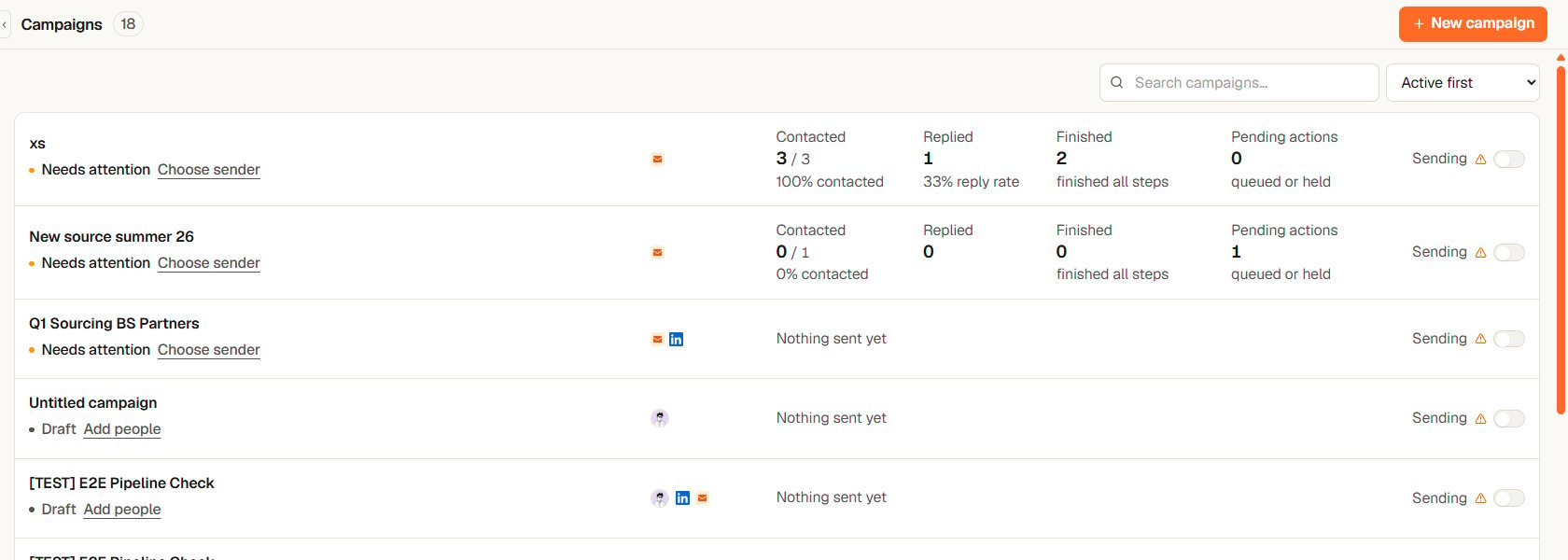
The Campaigns page: one row per campaign with its state, the fix it needs, four numbers and the sending switch
Reading the Campaigns page
Each row answers four questions in order: which campaign, is it running or does it need you, has anyone replied, how much has gone out.- Status word. One of six: Draft (not ready yet), Needs attention (a sender or a step is missing), Paused (ready, sending off), Active (sending on), Completed, Archived. Next to Draft and Needs attention there is exactly one link that takes you to the fix: Add people, Add steps, Fix sequence, Connect sender or Choose sender.
- Four numbers. Contacted counts people with at least one confirmed send, out of everyone in the campaign. Replied counts people whose reply was matched, with the reply rate against the people contacted. Finished counts people who completed every step. Pending actions counts queued or held sends, including overdue ones. Until the first send, the row simply says Nothing sent yet.
- Owner and channels. The small avatar is the campaign owner. The badges show which channels the sequence uses.
- Sending. The switch on the right starts and stops the campaign. When it is on but something blocks sending, the row says Blocked next to it.
Two kinds of campaign
- Sourcing — reach out to candidates for a role. You can link a job so replies and pipeline stay connected.
- Business Dev — reach out to potential clients.
What a campaign can send
- Email — sent from your own connected Google or Microsoft account, with your signature.
- LinkedIn connection request — invites the person to connect. One per sequence.
- LinkedIn message — reaches only people connected to you. A sequence therefore starts with a connection request, and Yena waits for the person to accept before the follow-up clock starts. For a list that is already your network, set the sequence to People you can already message. See How a LinkedIn campaign reaches people.
- WhatsApp message — for people with a WhatsApp number.
The rules Yena enforces for you
- A reply stops everything. When a matched reply arrives on any channel, Yena exits that person from every campaign and cancels their remaining steps. You take over in Inbox.
- Nothing sends until you switch it on. Sending starts only from the Start sending button on the campaign’s Overview tab, and the switch on the Campaigns page can only pause. See Review who goes out, then start or pause. Building, editing, and previewing are always safe.
- A campaign must be ready before it can start. Yena checks your people, steps, sender accounts, and delivery window, and names anything that is missing.
- Sending is paced. Daily limits and human-like spacing protect your email deliverability and your LinkedIn account.
Where to go next
- Run a campaign from setup to replies — the full walkthrough.
- Build your sequence — steps, timing, and personalization.
- Track progress and replies — what every status means.
- Sending limits and account safety — how Yena protects your accounts.
Campaigns are available on the Pro and Team plans. You will also need a connected email account or connected LinkedIn account to send.