
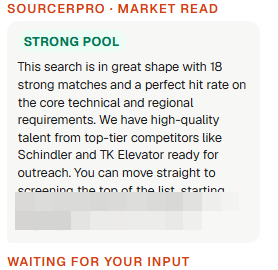
Every finished search includes a market read: a plain-language assessment of the pool the Sourcer just screened.
Market read panel

A strong-pool read with competitor concentration

What it contains

The market read sits in the chat panel under the label Market read.
  • A pool badge: Strong pool or Thin pool. It says how many genuinely strong matches exist against your must-haves, not how many profiles vaguely resemble the title.
  • A short summary of the pool in plain words.
  • Strongest cluster: where the talent sits, the employers or groups that keep appearing. That’s your approach map and your client’s competitive context in one.
  • Bottleneck: the constraint that is doing the most filtering.
  • Suggested follow-up searches: tick one or more and press Send to refine with them.

How to read a thin pool

A thin pool is a finding, not a failure. It usually means one constraint is doing too much filtering, often language or radius in DACH searches. Before promising a client numbers, read the Bottleneck line and the Suggested follow-up searches. Loosening the right constraint is a conversation you can now have with evidence. The Suggestions above it work the same way.

Using it commercially

The market read is client-safe by design: it describes the market, not individuals. Quoting it in a status update (“18 strong matches, concentrated at three competitors”) makes your work visible — and it’s the backbone of the market-read BD play.