

1. The candidate uploads their CV
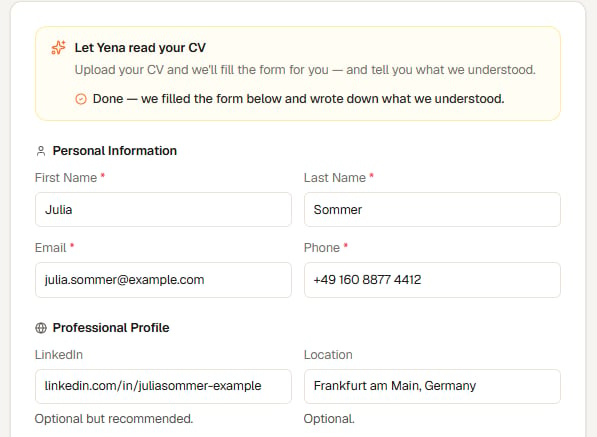
Upload the CV, and the personal details fill themselves in
2. Yena shows what it understood
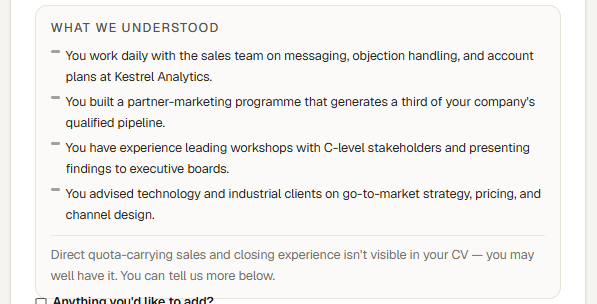
Up to four strengths in plain language, and at most one invitation to say more
- Strengths first, always. The card opens with what the person brings.
- No scores, no percentages, no ranking. Candidates are never shown a number about themselves.
- At most one line about something not visible. It sits below a divider, and it is phrased as an invitation — “…isn’t visible in your CV — you may well have it. You can tell us more below” — never as a judgment and never as a rejection.
- That line points straight at the optional Anything you’d like to add? box directly beneath it, so a candidate who has the missing experience can simply say so.
The card never rejects anybody and never decides anything. It exists so the candidate can see they were read properly — and so that anything their CV failed to say gets one more chance to be said.
3. The rest of the application
Below the card, the application continues as normal: the free-text note, any screening questions you added to the role, the CV and documents, and the privacy consent. After submitting, the candidate confirms by email. Only confirmed applications reach your inbound queue, and they arrive as fully parsed candidate profiles.What recruiters should know
- An application is never blocked on AI. If the parse is slow or fails, the form behaves exactly like an ordinary application form and the candidate applies as usual. The AI step is an upgrade, never a gate.
- Nothing is stored until they submit. The parse used to fill the form is not kept for candidates who change their mind and close the tab.
- You see what they saw. The reflection shown to the candidate is saved with their application, so when you open it later you are reading the same words they read.