

Add questions to a job
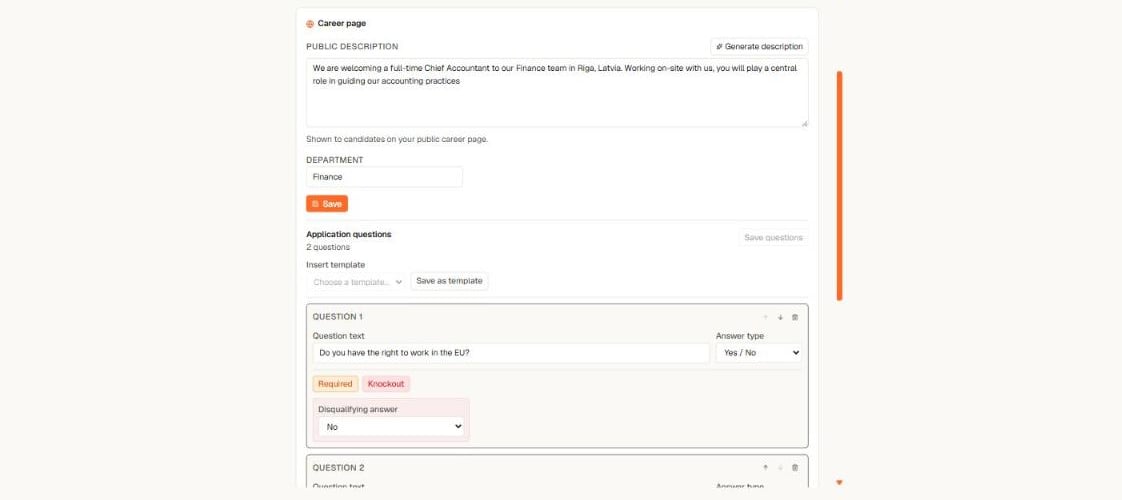
The question editor on the job's Details tab — answer types, Required, and Knockout per question
- Open the job → Details tab → Application questions.
- Select Add question and write the question text.
- Pick an answer type: Yes / No, single choice, short text, or number.
- Mark it Required if the candidate must answer to apply.
- Select Save questions.
Knockout questions
A question can carry a Knockout flag with the disqualifying answer — for example “Do you have the right to work in the EU?” with No as disqualifying.A knockout hit never rejects anyone automatically. The applicant still lands in your inbound queue with a quiet Knockout marker on the row — a person always makes the decision, and the respectful rejection is one click when they do. Short-text questions can never knock out.
Reuse a set with templates
Ask the same things on every mandate? Save them once:- Save as template stores the job’s current questions under a name — for example “Standard DACH set”.
- Insert template appends a saved set to any other job. Inserted questions are independent copies, so editing them on one job never changes another.