

Daily limits
Open a campaign and go to Settings. Daily limits shows the real number for each channel — emails, LinkedIn messages, LinkedIn invitations, WhatsApp — that this campaign may send per day, per connected account.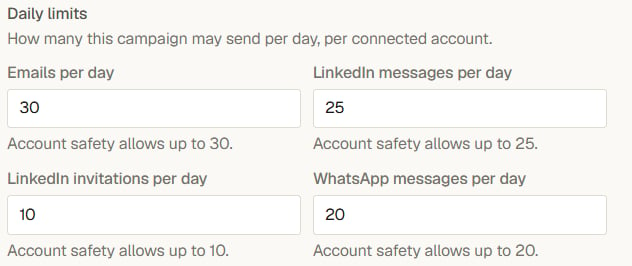
Each channel's number, with the ceiling written underneath it
Human pacing
- Messages go out inside your delivery window, on business days if you keep that setting on.
- LinkedIn and WhatsApp actions are spaced out with small randomized gaps rather than fired in a burst — a pattern of instant, evenly-timed actions is exactly what platforms flag.
- One campaign never monopolizes an account: limits are counted per sender account, across all campaigns using it.
The do-not-contact list
Your workspace has a do-not-contact list. People on it are never sent a campaign step, in any campaign. Yena also maintains it automatically:- Replies — a person who replies exits all campaigns (see Track progress and replies).
- Bounces — when an email hard-bounces because the address no longer exists, Yena records the address as undeliverable and stops sending to it. Temporary failures and out-of-office replies do not count.
Email signatures
Email sent through a provider’s API does not automatically get the signature you set in Gmail or Outlook. Yena stores a signature per connected mailbox and appends it to every campaign email:- Google accounts — import your existing Gmail signature with one click, or paste one.
- Microsoft accounts — Microsoft does not expose signatures, so paste yours once in Settings → Connected Accounts.
If your company adds a footer to all outgoing mail at the server level, leave the signature in Yena empty to avoid double-signing.
Good practice
- Start small. A short sequence to a well-chosen list outperforms a long chain to a broad one — and teaches you what works before you scale.
- Warm up new mailboxes. A freshly created email account should not send at full volume on day one.
- Write like a person. Personalization fields help, but the preview is the real test: read the rendered message and ask whether you would reply to it.
- Respect a no. If someone declines, add them to the do-not-contact list so no future campaign reaches them.