Reach people outside your network: the InMail step
Add an InMail to any campaign. Yena sends it from your Premium, Recruiter or Sales Navigator seat, uses free InMails where it can, and sends a connection request instead when a credit is missing.
Lena fills site manager roles for construction firms around Munich. Her shortlist for a new mandate has 30 strong people, and 26 of them are not connected to her on LinkedIn.A connection request reaches those 26 only once they accept. Many accept days later, some never do, and the client wants a first call this week. An InMail lands in their LinkedIn inbox on day one, with a subject line, from the seat Lena already pays for.Until now that meant leaving Yena and writing 26 InMails by hand. With the InMail step she writes the message once, puts it first in her campaign, and Yena sends it person by person. People with an open profile get it for free. Anyone who does not answer gets her connection request three days later. Anyone who does answer drops out of the campaign, and the reply is in her Inbox.
Sends from the right product by itself. Yena reads which LinkedIn product your connected seat has, Premium, Recruiter or Sales Navigator, and sends the InMail the way that product expects. You never pick a mode.
Spends credits carefully. People with an open profile receive the InMail for free, even when your balance is zero. For everyone else Yena checks your seat’s balance just before sending.
Falls back to a connection request. When there is no credit left, or the person cannot receive InMails, they get your connection request instead. If a request is already waiting for them, Yena does not send a second one.
Talks to connections like connections. Someone already in your network gets the same text as an ordinary LinkedIn message. If you already have a conversation with them, the text goes into that conversation. No credit is spent in either case.
Never sends twice. If LinkedIn does not confirm that an InMail went out, Yena stops for that person and tells you, rather than trying again and spending a second credit.
Catches the reply. An answer to an InMail shows up in your Inbox and stops the campaign for that person, like any reply.
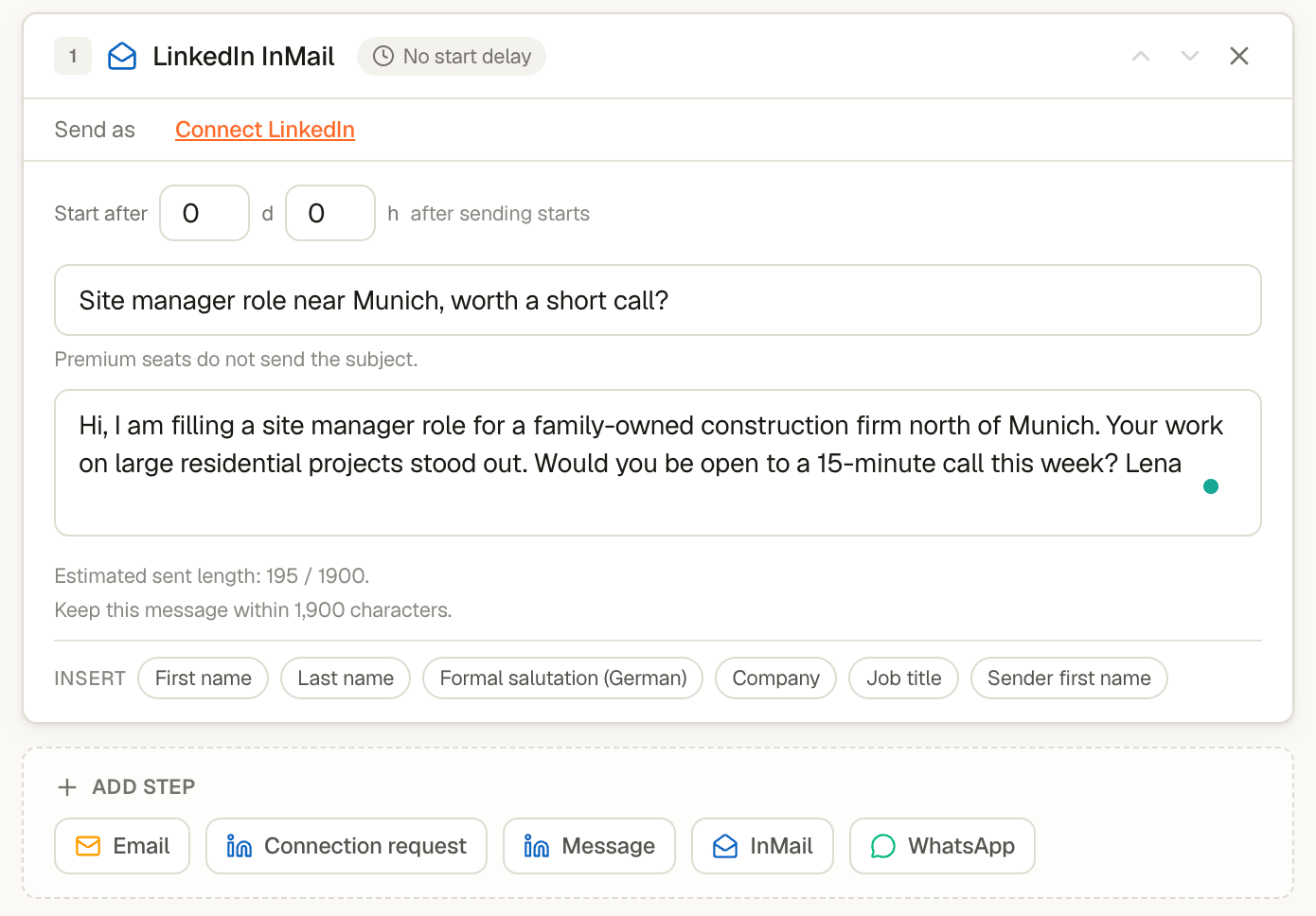
In the campaign’s Sequence tab, click InMail under Add step. In an empty sequence the same button sits under Start from scratch. The step appears as LinkedIn InMail. Move it wherever it makes sense: as the first touch, after a connection request that went unanswered, or between two emails.
An InMail step with its subject and message. Send as shows your LinkedIn seat once one is connected.
2
Write the subject and the message
The subject is required, up to 200 characters. The message is plain text, up to 1,900 characters, with the same personalisation fields as every other step. Premium seats do not send the subject, so make the first line of the message count.
3
Check the seat line
Under Send as, the step shows what your seat can do: the product it sends from, the InMail credits left, and when they were last checked. If the seat cannot send InMails, the campaign shows “This seat cannot send InMails. Remove the step or choose another seat.” and will not start until you do one of the two.
Credits belong to LinkedIn. Yena shows the balance it reads from your seat and never buys credits. If the balance cannot be read, Yena pauses the step rather than guessing.
A day of space. Yena waits at least 24 hours after your last unanswered message to the same person before sending them an InMail.
Daily limits still apply. An InMail counts toward your seat’s daily LinkedIn message limit. A connection request sent instead counts toward your daily invitation limit. See Sending limits and safety.
Recruiter InMails are signed. Yena signs them with the name on your connected seat.
A strong shape for cold outreach: InMail first, wait three days, connection request, then a LinkedIn message one day after they accept. People who answer the InMail never see the rest.
⌘I
{"docsConfig":{"theme":"maple","$schema":"https://mintlify.com/docs.json","name":"Yena Help Center","description":"How to source, shortlist, and place with Yena.","colors":{"primary":"#FF4C00","light":"#FF6A2B","dark":"#E04300"},"logo":{"light":"https://mintcdn.com/yena/syYzOb4jHO7iuYSP/images/logo.png?fit=max\u0026auto=format\u0026n=syYzOb4jHO7iuYSP\u0026q=85\u0026s=80958bb66a092de311e3caaadc0354a4","dark":"https://mintcdn.com/yena/syYzOb4jHO7iuYSP/images/yena-icon-white.svg?fit=max\u0026auto=format\u0026n=syYzOb4jHO7iuYSP\u0026q=85\u0026s=8bc4814e47db83c354db7c7f0af1e420"},"favicon":"https://mintcdn.com/yena/syYzOb4jHO7iuYSP/favicon.ico?fit=max\u0026auto=format\u0026n=syYzOb4jHO7iuYSP\u0026q=85\u0026s=24b306bf9b37bcbdb150fc1d47d97d22","appearance":{"default":"light"},"navbar":{"links":[{"href":"https://www.yena.ai/contact","label":"Contact"}],"primary":{"type":"button","label":"Open Yena","href":"https://my.yena.ai"}},"footer":{"socials":{"website":"https://www.yena.ai","linkedin":"https://www.linkedin.com/company/yena-ai"}},"seo":{"indexing":"navigable"},"integrations":{"posthog":{"apiKey":"phc_thrMVo9rYrhvYUXRnBZDxtSWz66aTSmnKR9BKzEUizt2"}},"styling":{"latex":false},"navigation":{"languages":[{"language":"de","href":"de"},{"language":"en","href":"en"}]}},"deployment":{"deploymentMetadataValue":{"subdomain":"yena","hasAudioNarration":false,"actualSubdomain":"yena","customDomains":["support.yena.ai"],"gitSource":{"type":"github","owner":"janiswotra","repo":"yena-docs","deployBranch":"main","contentDirectory":"","isPrivate":true,"mountPath":"","label":""},"chroma":{"collectionId":"28f2e9b2-b25c-4e21-bf81-6e92262d6a80","liveDeploymentHistoryId":"6ae75efa748e6ef8daaf1226","schemaVersion":"v3","latestBuiltDeploymentHistoryId":"6ae75efa748e6ef8daaf1226"},"entitlements":{"AI_CHAT":{"status":"DISABLED"}},"buildId":"6ae75efa748e6ef8daaf1226","clientVersion":"0.0.4044","searchFilterCounts":[{"language":"de","tag":"Pipeline \u0026 CRM","count":12},{"language":"de","tag":"Der Sourcer","count":12},{"language":"en","tag":"Pipeline \u0026 CRM","count":12},{"language":"en","tag":"The Sourcer","count":12},{"language":"de","tag":"Erste Schritte","count":10},{"language":"de","tag":"Arbeitsbereich","count":10},{"language":"en","tag":"Getting Started","count":10},{"language":"en","tag":"Workspace","count":10},{"language":"de","tag":"Kampagnen","count":9},{"language":"de","tag":"Karriereseite","count":9},{"language":"de","tag":"Leitfäden","count":9},{"language":"en","tag":"Campaigns","count":9},{"language":"en","tag":"Career Page","count":9},{"language":"en","tag":"Guides","count":9},{"language":"de","tag":"Kundenportal","count":7},{"language":"en","tag":"Client Portal","count":7},{"language":"de","tag":"Datenschutz \u0026 DSGVO","count":3},{"language":"en","tag":"Privacy \u0026 GDPR","count":3},{"language":"de","tag":"Integrationen","count":2},{"language":"en","tag":"Integrations","count":2}]},"assistantConfig":{"enableAskAiButton":false,"enableStarterQuestions":false,"enableContextualStarterQuestions":false,"enableAskAiSearchBar":true},"basePath":"","hasChatPermissions":false,"hasWebMcpPermissions":false,"toggles":[{"name":"kill-isr","enabled":true,"variant":{"name":"disabled","enabled":false,"feature_enabled":true},"impressionData":false},{"name":"agent-mintlify-slack","enabled":true,"variant":{"name":"disabled","enabled":false,"feature_enabled":true},"impressionData":false},{"name":"agent-integrations-settings","enabled":true,"variant":{"name":"disabled","enabled":false,"feature_enabled":true},"impressionData":false},{"name":"automations-pr-grouping","enabled":true,"variant":{"name":"disabled","enabled":false,"feature_enabled":true},"impressionData":false},{"name":"custom-prefix","enabled":true,"variant":{"name":"disabled","enabled":false,"feature_enabled":true},"impressionData":false},{"name":"analytics-v7","enabled":true,"variant":{"name":"disabled","enabled":false,"feature_enabled":true},"impressionData":false},{"name":"user-flows-analytics","enabled":true,"variant":{"name":"disabled","enabled":false,"feature_enabled":true},"impressionData":false},{"name":"no-publish-flow","enabled":true,"variant":{"name":"disabled","enabled":false,"feature_enabled":true},"impressionData":false},{"name":"workos-onboarding","enabled":true,"variant":{"name":"disabled","enabled":false,"feature_enabled":true},"impressionData":false},{"name":"llms-txt-v2","enabled":true,"variant":{"name":"disabled","enabled":false,"feature_enabled":true},"impressionData":false},{"name":"snapshot-serving-live","enabled":true,"variant":{"name":"disabled","enabled":false,"feature_enabled":true},"impressionData":false},{"name":"stripTemperatureMiddleware","enabled":true,"variant":{"name":"disabled","enabled":false,"feature_enabled":true},"impressionData":false},{"name":"support-platform-pylon-zendesk","enabled":true,"variant":{"name":"disabled","enabled":false,"feature_enabled":true},"impressionData":false},{"name":"snapshot-serving","enabled":true,"variant":{"name":"disabled","enabled":false,"feature_enabled":true},"impressionData":false},{"name":"instant-rollback","enabled":true,"variant":{"name":"disabled","enabled":false,"feature_enabled":true},"impressionData":false},{"name":"granular-notifications-server","enabled":true,"variant":{"name":"disabled","enabled":false,"feature_enabled":true},"impressionData":false},{"name":"granular-notifications","enabled":true,"variant":{"name":"disabled","enabled":false,"feature_enabled":true},"impressionData":false},{"name":"automations-fable","enabled":true,"variant":{"name":"disabled","enabled":false,"feature_enabled":true},"impressionData":false},{"name":"fixed-ai-action-pricing","enabled":true,"variant":{"name":"disabled","enabled":false,"feature_enabled":true},"impressionData":false},{"name":"automation-resolve-merge-conflict","enabled":true,"variant":{"name":"disabled","enabled":false,"feature_enabled":true},"impressionData":false},{"name":"scoped-publishing","enabled":true,"variant":{"name":"disabled","enabled":false,"feature_enabled":true},"impressionData":false},{"name":"mintql","enabled":true,"variant":{"name":"disabled","enabled":false,"feature_enabled":true},"impressionData":false},{"name":"page-level-analytics","enabled":true,"variant":{"name":"disabled","enabled":false,"feature_enabled":true},"impressionData":false},{"name":"editor-version-history-v2","enabled":true,"variant":{"name":"disabled","enabled":false,"feature_enabled":true},"impressionData":false},{"name":"billing-page-v2","enabled":true,"variant":{"name":"disabled","enabled":false,"feature_enabled":true},"impressionData":false},{"name":"full-page-search","enabled":true,"variant":{"name":"disabled","enabled":false,"feature_enabled":true},"impressionData":false},{"name":"workspace-projects","enabled":true,"variant":{"name":"disabled","enabled":false,"feature_enabled":true},"impressionData":false},{"name":"assistant-v5","enabled":true,"variant":{"name":"disabled","enabled":false,"feature_enabled":true},"impressionData":false},{"name":"byok-sep-25","enabled":true,"variant":{"name":"disabled","enabled":false,"feature_enabled":true},"impressionData":false},{"name":"fork-pr-previews","enabled":true,"variant":{"name":"disabled","enabled":false,"feature_enabled":true},"impressionData":false},{"name":"revalidation-jwt","enabled":true,"variant":{"name":"disabled","enabled":false,"feature_enabled":true},"impressionData":false},{"name":"vite-origin","enabled":true,"variant":{"name":"disabled","enabled":false,"feature_enabled":true},"impressionData":false},{"name":"billing-updated-9-15","enabled":true,"variant":{"name":"disabled","enabled":false,"feature_enabled":true},"impressionData":false},{"name":"workos-sso-scim","enabled":true,"variant":{"name":"disabled","enabled":false,"feature_enabled":true},"impressionData":false},{"name":"hobby-abuse-scan","enabled":true,"variant":{"name":"disabled","enabled":false,"feature_enabled":true},"impressionData":false},{"name":"dashboard-inbox","enabled":true,"variant":{"name":"disabled","enabled":false,"feature_enabled":true},"impressionData":false},{"name":"workos-signup","enabled":true,"variant":{"name":"disabled","enabled":false,"feature_enabled":true},"impressionData":false},{"name":"turbopuffer-dual-write","enabled":true,"variant":{"name":"disabled","enabled":false,"feature_enabled":true},"impressionData":false},{"name":"workos-enabled","enabled":true,"variant":{"name":"disabled","enabled":false,"feature_enabled":true},"impressionData":false},{"name":"approve-review-flow","enabled":true,"variant":{"name":"disabled","enabled":false,"feature_enabled":true},"impressionData":false},{"name":"sso-setup-deadline-banner","enabled":true,"variant":{"name":"disabled","enabled":false,"feature_enabled":true},"impressionData":false}],"googleFontsInlined":false},"customCss":[],"page":{"pagePath":"en/campaigns/inmail-step","slug":"/en/campaigns/inmail-step","pageMetadata":{"title":"Reach people outside your network: the InMail step","sidebarTitle":"InMail step","description":"Add an InMail to any campaign. Yena sends it from your Premium, Recruiter or Sales Navigator seat, uses free InMails where it can, and sends a connection request instead when a credit is missing.","href":"/en/campaigns/inmail-step"},"description":{"compiledSource":"\"use strict\";\nconst {jsx: _jsx} = arguments[0];\nconst {useMDXComponents: _provideComponents} = arguments[0];\nfunction _createMdxContent(props) {\n const _components = {\n p: \"p\",\n ..._provideComponents(),\n ...props.components\n };\n return _jsx(_components.p, {\n children: \"Add an InMail to any campaign. Yena sends it from your Premium, Recruiter or Sales Navigator seat, uses free InMails where it can, and sends a connection request instead when a credit is missing.\"\n });\n}\nfunction MDXContent(props = {}) {\n const {wrapper: MDXLayout} = {\n ..._provideComponents(),\n ...props.components\n };\n return MDXLayout ? _jsx(MDXLayout, {\n ...props,\n children: _jsx(_createMdxContent, {\n ...props\n })\n }) : _createMdxContent(props);\n}\nreturn {\n default: MDXContent\n};\n","frontmatter":{},"scope":{}},"pageType":"default","mdx":{"mdxSource":{"compiledSource":"\"use strict\";const{Fragment:_Fragment,jsx:_jsx,jsxs:_jsxs}=arguments[0];const{useMDXComponents:_provideComponents}=arguments[0];function _createMdxContent(props){const _components={a:`a`,li:`li`,p:`p`,strong:`strong`,tbody:`tbody`,td:`td`,th:`th`,thead:`thead`,tr:`tr`,ul:`ul`,..._provideComponents(),...props.components},{Frame,Heading,OptimizedImage,Step,Steps,Table,Tip}=_components;if(!Frame)_missingMdxReference(`Frame`,true);if(!Heading)_missingMdxReference(`Heading`,true);if(!OptimizedImage)_missingMdxReference(`OptimizedImage`,true);if(!Step)_missingMdxReference(`Step`,true);if(!Steps)_missingMdxReference(`Steps`,true);if(!Table)_missingMdxReference(`Table`,true);if(!Tip)_missingMdxReference(`Tip`,true);return _jsxs(_Fragment,{children:[_jsx(Heading,{level:`2`,id:`why-it-matters`,children:`Why it matters`}),`\n`,_jsx(_components.p,{children:`Lena fills site manager roles for construction firms around Munich. Her shortlist for a new mandate has 30 strong people, and 26 of them are not connected to her on LinkedIn.`}),`\n`,_jsx(_components.p,{children:`A connection request reaches those 26 only once they accept. Many accept days later, some never do, and the client wants a first call this week. An InMail lands in their LinkedIn inbox on day one, with a subject line, from the seat Lena already pays for.`}),`\n`,_jsx(_components.p,{children:`Until now that meant leaving Yena and writing 26 InMails by hand. With the InMail step she writes the message once, puts it first in her campaign, and Yena sends it person by person. People with an open profile get it for free. Anyone who does not answer gets her connection request three days later. Anyone who does answer drops out of the campaign, and the reply is in her Inbox.`}),`\n`,_jsx(Heading,{level:`2`,id:`what-the-step-does`,children:`What the step does`}),`\n`,_jsxs(_components.ul,{children:[`\n`,_jsxs(_components.li,{children:[_jsx(_components.strong,{children:`Sends from the right product by itself.`}),` Yena reads which LinkedIn product your connected seat has, Premium, Recruiter or Sales Navigator, and sends the InMail the way that product expects. You never pick a mode.`]}),`\n`,_jsxs(_components.li,{children:[_jsx(_components.strong,{children:`Spends credits carefully.`}),` People with an open profile receive the InMail for free, even when your balance is zero. For everyone else Yena checks your seat’s balance just before sending.`]}),`\n`,_jsxs(_components.li,{children:[_jsx(_components.strong,{children:`Falls back to a connection request.`}),` When there is no credit left, or the person cannot receive InMails, they get your connection request instead. If a request is already waiting for them, Yena does not send a second one.`]}),`\n`,_jsxs(_components.li,{children:[_jsx(_components.strong,{children:`Talks to connections like connections.`}),` Someone already in your network gets the same text as an ordinary LinkedIn message. If you already have a conversation with them, the text goes into that conversation. No credit is spent in either case.`]}),`\n`,_jsxs(_components.li,{children:[_jsx(_components.strong,{children:`Never sends twice.`}),` If LinkedIn does not confirm that an InMail went out, Yena stops for that person and tells you, rather than trying again and spending a second credit.`]}),`\n`,_jsxs(_components.li,{children:[_jsx(_components.strong,{children:`Catches the reply.`}),` An answer to an InMail shows up in your Inbox and stops the campaign for that person, like any reply.`]}),`\n`]}),`\n`,_jsx(Heading,{level:`2`,id:`add-the-step`,children:`Add the step`}),`\n`,_jsxs(Steps,{children:[_jsxs(Step,{title:`Open the sequence and add an InMail step`,children:[_jsxs(_components.p,{children:[`In the campaign’s `,_jsx(_components.strong,{children:`Sequence`}),` tab, click `,_jsx(_components.strong,{children:`InMail`}),` under `,_jsx(_components.strong,{children:`Add step`}),`. In an empty sequence the same button sits under `,_jsx(_components.strong,{children:`Start from scratch`}),`. The step appears as `,_jsx(_components.strong,{children:`LinkedIn InMail`}),`. Move it wherever it makes sense: as the first touch, after a connection request that went unanswered, or between two emails.`]}),_jsx(Frame,{caption:`An InMail step with its subject and message. Send as shows your LinkedIn seat once one is connected.`,children:_jsx(OptimizedImage,{src:`https://mintcdn.com/yena/PQ-sqw3B1pWnzzMd/images/screenshots/campaigns/inmail-step.png?fit=max\u0026auto=format\u0026n=PQ-sqw3B1pWnzzMd\u0026q=85\u0026s=fd61ad0c87c98f27c0a37316b4291bef`,alt:`Sequence editor with a LinkedIn InMail step, its subject and its message`,\"data-og-width\":`1316`,width:`1316`,\"data-og-height\":`916`,height:`916`,\"data-path\":`images/screenshots/campaigns/inmail-step.png`,\"data-optimize\":`true`,\"data-opv\":`3`,srcset:`https://mintcdn.com/yena/PQ-sqw3B1pWnzzMd/images/screenshots/campaigns/inmail-step.png?w=280\u0026fit=max\u0026auto=format\u0026n=PQ-sqw3B1pWnzzMd\u0026q=85\u0026s=8ca30f23ce88cd5b5e40ff64930f60b2 280w, https://mintcdn.com/yena/PQ-sqw3B1pWnzzMd/images/screenshots/campaigns/inmail-step.png?w=560\u0026fit=max\u0026auto=format\u0026n=PQ-sqw3B1pWnzzMd\u0026q=85\u0026s=0c14aebea3868eb96342770dbd061642 560w, https://mintcdn.com/yena/PQ-sqw3B1pWnzzMd/images/screenshots/campaigns/inmail-step.png?w=840\u0026fit=max\u0026auto=format\u0026n=PQ-sqw3B1pWnzzMd\u0026q=85\u0026s=d93336a65be489c6fe3be9f9285d0506 840w, https://mintcdn.com/yena/PQ-sqw3B1pWnzzMd/images/screenshots/campaigns/inmail-step.png?w=1100\u0026fit=max\u0026auto=format\u0026n=PQ-sqw3B1pWnzzMd\u0026q=85\u0026s=9887736ba06974b461485239a4c3d12c 1100w, https://mintcdn.com/yena/PQ-sqw3B1pWnzzMd/images/screenshots/campaigns/inmail-step.png?w=1650\u0026fit=max\u0026auto=format\u0026n=PQ-sqw3B1pWnzzMd\u0026q=85\u0026s=a90b5ab31b128dcedbcaa8406fbd45a5 1650w, https://mintcdn.com/yena/PQ-sqw3B1pWnzzMd/images/screenshots/campaigns/inmail-step.png?w=2500\u0026fit=max\u0026auto=format\u0026n=PQ-sqw3B1pWnzzMd\u0026q=85\u0026s=f61772505e32bf627224bd634ed27c86 2500w`})})]}),_jsx(Step,{title:`Write the subject and the message`,children:_jsx(_components.p,{children:`The subject is required, up to 200 characters. The message is plain text, up to 1,900 characters, with the same personalisation fields as every other step. Premium seats do not send the subject, so make the first line of the message count.`})}),_jsx(Step,{title:`Check the seat line`,children:_jsxs(_components.p,{children:[`Under `,_jsx(_components.strong,{children:`Send as`}),`, the step shows what your seat can do: the product it sends from, the InMail credits left, and when they were last checked. If the seat cannot send InMails, the campaign shows “This seat cannot send InMails. Remove the step or choose another seat.” and will not start until you do one of the two.`]})}),_jsx(Step,{title:`Start the campaign and follow each person`,children:_jsx(_components.p,{children:`Each person’s row says what happened to them.`})})]}),`\n`,_jsx(Heading,{level:`2`,id:`what-each-person’s-row-tells-you`,children:`What each person’s row tells you`}),`\n`,_jsxs(Table,{children:[_jsx(_components.thead,{children:_jsxs(_components.tr,{children:[_jsx(_components.th,{children:`The row says`}),_jsx(_components.th,{children:`What happened`})]})}),_jsxs(_components.tbody,{children:[_jsxs(_components.tr,{children:[_jsx(_components.td,{children:`InMail sent, waiting for a reply`}),_jsx(_components.td,{children:`The InMail went out.`})]}),_jsxs(_components.tr,{children:[_jsx(_components.td,{children:`No InMail credit, invitation sent instead`}),_jsx(_components.td,{children:`Your balance was zero, so the person got your connection request.`})]}),_jsxs(_components.tr,{children:[_jsx(_components.td,{children:`This person cannot receive InMail, invitation sent instead`}),_jsx(_components.td,{children:`LinkedIn does not let this person receive InMails, so they got your connection request.`})]}),_jsxs(_components.tr,{children:[_jsx(_components.td,{children:`No InMail credit, invitation already pending`}),_jsx(_components.td,{children:`No credit, and your request was already waiting, so nothing new was sent.`})]}),_jsxs(_components.tr,{children:[_jsx(_components.td,{children:`Sent as a regular message, already connected`}),_jsx(_components.td,{children:`The person is in your network, so the text went as a normal message.`})]}),_jsxs(_components.tr,{children:[_jsx(_components.td,{children:`Sent as a regular message in the existing conversation`}),_jsx(_components.td,{children:`You already talk to this person, so the text went into that conversation.`})]})]})]}),`\n`,_jsx(Heading,{level:`2`,id:`good-to-know`,children:`Good to know`}),`\n`,_jsxs(_components.ul,{children:[`\n`,_jsxs(_components.li,{children:[_jsx(_components.strong,{children:`Credits belong to LinkedIn.`}),` Yena shows the balance it reads from your seat and never buys credits. If the balance cannot be read, Yena pauses the step rather than guessing.`]}),`\n`,_jsxs(_components.li,{children:[_jsx(_components.strong,{children:`A day of space.`}),` Yena waits at least 24 hours after your last unanswered message to the same person before sending them an InMail.`]}),`\n`,_jsxs(_components.li,{children:[_jsx(_components.strong,{children:`Daily limits still apply.`}),` An InMail counts toward your seat’s daily LinkedIn message limit. A connection request sent instead counts toward your daily invitation limit. See `,_jsx(_components.a,{href:`/en/campaigns/sending-limits-and-safety`,children:`Sending limits and safety`}),`.`]}),`\n`,_jsxs(_components.li,{children:[_jsx(_components.strong,{children:`Recruiter InMails are signed.`}),` Yena signs them with the name on your connected seat.`]}),`\n`]}),`\n`,_jsx(Tip,{children:_jsx(_components.p,{children:`A strong shape for cold outreach: InMail first, wait three days, connection request, then a LinkedIn message one day after they accept. People who answer the InMail never see the rest.`})})]})}function MDXContent(props={}){const{wrapper:MDXLayout}={..._provideComponents(),...props.components};return MDXLayout?_jsx(MDXLayout,{...props,children:_jsx(_createMdxContent,{...props})}):_createMdxContent(props)}return{default:MDXContent};function _missingMdxReference(id,component){throw new Error(`Expected `+(component?`component`:`object`)+\" `\"+id+\"` to be defined: you likely forgot to import, pass, or provide it.\")}","frontmatter":{},"scope":{"config":{},"pageMetadata":{"title":"Reach people outside your network: the InMail step","sidebarTitle":"InMail step","description":"Add an InMail to any campaign. Yena sends it from your Premium, Recruiter or Sales Navigator seat, uses free InMails where it can, and sends a connection request instead when a credit is missing.","href":"/en/campaigns/inmail-step"}}},"mdxSourceWithNoJs":null},"mdxExtracts":{"tableOfContents":[{"title":"Why it matters","slug":"why-it-matters","depth":2,"children":[]},{"title":"What the step does","slug":"what-the-step-does","depth":2,"children":[]},{"title":"Add the step","slug":"add-the-step","depth":2,"children":[]},{"title":"What each person’s row tells you","slug":"what-each-person’s-row-tells-you","depth":2,"children":[]},{"title":"Good to know","slug":"good-to-know","depth":2,"children":[]}],"codeExamples":{}},"jsLinks":[],"subdomain":"yena","siteName":"Yena Help Center","title":"Reach people outside your network: the InMail step - Yena Help Center","navMaps":{"firstHrefInVersion":{},"firstHrefInLanguage":{"de":{"href":"/de/campaigns/inmail-step","matchLevel":1},"en":{"href":"/en/campaigns/inmail-step","matchLevel":0}}},"lastModified":"2026-10-30T13:40:21.066Z","originalFileLocation":"en/campaigns/inmail-step.mdx","locale":"en"},"headHtml":"\u003cscript data-mint-head>(function(){var d=document.documentElement,p=null;if(!p){try{p=localStorage.getItem(\"isDarkMode\")}catch(e){}if(p==='true')p='dark';else if(p==='false')p='light';if(p!=='light'\u0026\u0026p!=='dark'\u0026\u0026p!=='system')p=\"light\"}var r=p==='system'?(matchMedia(\"(prefers-color-scheme: dark)\").matches?'dark':'light'):p;d.classList.remove(r==='dark'?'light':'dark');d.classList.add(r);d.setAttribute(\"data-theme-preference\",p)})();\u003c/script>\u003cmeta data-mint-head name=\"description\" content=\"Add an InMail to any campaign. Yena sends it from your Premium, Recruiter or Sales Navigator seat, uses free InMails where it can, and sends a connection request instead when a credit is missing.\">\u003cmeta data-mint-head name=\"application-name\" content=\"Yena Help Center\">\u003cmeta data-mint-head name=\"generator\" content=\"Mintlify\">\u003clink data-mint-head rel=\"icon\" type=\"image/png\" sizes=\"192x192\" href=\"/mintlify-assets/_mintlify/favicons/yena/iFdCni0QwwSgr61G/_generated/favicon/android-chrome-192x192.png\" media=\"(prefers-color-scheme: light)\">\u003clink data-mint-head rel=\"apple-touch-icon\" type=\"image/png\" sizes=\"180x180\" href=\"/mintlify-assets/_mintlify/favicons/yena/iFdCni0QwwSgr61G/_generated/favicon/apple-touch-icon.png\">\u003clink data-mint-head rel=\"icon\" type=\"image/png\" sizes=\"16x16\" href=\"/mintlify-assets/_mintlify/favicons/yena/iFdCni0QwwSgr61G/_generated/favicon/favicon-16x16.png\" media=\"(prefers-color-scheme: light)\">\u003clink data-mint-head rel=\"icon\" type=\"image/png\" sizes=\"32x32\" href=\"/mintlify-assets/_mintlify/favicons/yena/iFdCni0QwwSgr61G/_generated/favicon/favicon-32x32.png\" media=\"(prefers-color-scheme: light)\">\u003clink data-mint-head rel=\"shortcut icon\" type=\"image/x-icon\" href=\"/mintlify-assets/_mintlify/favicons/yena/iFdCni0QwwSgr61G/_generated/favicon/favicon.ico\" media=\"(prefers-color-scheme: light)\">\u003clink data-mint-head rel=\"icon\" type=\"image/png\" sizes=\"192x192\" href=\"/mintlify-assets/_mintlify/favicons/yena/iFdCni0QwwSgr61G/_generated/favicon-dark/android-chrome-192x192.png\" media=\"(prefers-color-scheme: dark)\">\u003clink data-mint-head rel=\"icon\" type=\"image/png\" sizes=\"16x16\" href=\"/mintlify-assets/_mintlify/favicons/yena/iFdCni0QwwSgr61G/_generated/favicon-dark/favicon-16x16.png\" media=\"(prefers-color-scheme: dark)\">\u003clink data-mint-head rel=\"icon\" type=\"image/png\" sizes=\"32x32\" href=\"/mintlify-assets/_mintlify/favicons/yena/iFdCni0QwwSgr61G/_generated/favicon-dark/favicon-32x32.png\" media=\"(prefers-color-scheme: dark)\">\u003clink data-mint-head rel=\"shortcut icon\" type=\"image/x-icon\" href=\"/mintlify-assets/_mintlify/favicons/yena/iFdCni0QwwSgr61G/_generated/favicon-dark/favicon.ico\" media=\"(prefers-color-scheme: dark)\">\u003cmeta data-mint-head property=\"og:title\" content=\"Reach people outside your network: the InMail step - Yena Help Center\">\u003cmeta data-mint-head property=\"og:description\" content=\"Add an InMail to any campaign. Yena sends it from your Premium, Recruiter or Sales Navigator seat, uses free InMails where it can, and sends a connection request instead when a credit is missing.\">\u003cmeta data-mint-head property=\"og:site_name\" content=\"Yena Help Center\">\u003cmeta data-mint-head property=\"og:url\" content=\"https://support.yena.ai/en/campaigns/inmail-step\">\u003cmeta data-mint-head property=\"og:type\" content=\"website\">\u003cmeta data-mint-head property=\"og:image\" content=\"https://yena.mintlify.app/_mintlify/api/og/v2?division=Campaigns\u0026amp;title=Reach+people+outside+your+network%3A+the+InMail+step\u0026amp;description=Add+an+InMail+to+any+campaign.+Yena+sends+it+from+your+Premium%2C+Recruiter+or+Sales+Navigator+seat%2C+uses+free+InMails+where+it+can%2C+and+sends+a+connection+reques\u0026amp;theme=9da1604e4107c1b21145ce7c\u0026amp;signature=a65518c653bcee728d12ab7dbbe535540db6ccd1c3c43965d090b221a7ae578c\">\u003cmeta data-mint-head property=\"og:image:width\" content=\"1200\">\u003cmeta data-mint-head property=\"og:image:height\" content=\"630\">\u003cmeta data-mint-head name=\"twitter:card\" content=\"summary_large_image\">\u003cmeta data-mint-head name=\"twitter:title\" content=\"Reach people outside your network: the InMail step - Yena Help Center\">\u003cmeta data-mint-head name=\"twitter:description\" content=\"Add an InMail to any campaign. Yena sends it from your Premium, Recruiter or Sales Navigator seat, uses free InMails where it can, and sends a connection request instead when a credit is missing.\">\u003cmeta data-mint-head name=\"twitter:image\" content=\"https://yena.mintlify.app/_mintlify/api/og/v2?division=Campaigns\u0026amp;title=Reach+people+outside+your+network%3A+the+InMail+step\u0026amp;description=Add+an+InMail+to+any+campaign.+Yena+sends+it+from+your+Premium%2C+Recruiter+or+Sales+Navigator+seat%2C+uses+free+InMails+where+it+can%2C+and+sends+a+connection+reques\u0026amp;theme=9da1604e4107c1b21145ce7c\u0026amp;signature=a65518c653bcee728d12ab7dbbe535540db6ccd1c3c43965d090b221a7ae578c\">\u003cmeta data-mint-head name=\"twitter:image:width\" content=\"1200\">\u003cmeta data-mint-head name=\"twitter:image:height\" content=\"630\">\u003cmeta data-mint-head name=\"msapplication-config\" content=\"/mintlify-assets/_mintlify/favicons/yena/iFdCni0QwwSgr61G/_generated/favicon/browserconfig.xml\">\u003cmeta data-mint-head name=\"apple-mobile-web-app-title\" content=\"Yena Help Center\">\u003cmeta data-mint-head name=\"msapplication-TileColor\" content=\"#FF4C00\">\u003clink data-mint-head rel=\"canonical\" href=\"https://support.yena.ai/en/campaigns/inmail-step\">\u003clink data-mint-head rel=\"alternate\" type=\"application/xml\" href=\"/sitemap.xml\">\u003clink data-mint-head rel=\"alternate\" type=\"text/markdown\" href=\"/en/campaigns/inmail-step.md\">\u003clink data-mint-head rel=\"alternate\" hreflang=\"en\" href=\"https://support.yena.ai/en/campaigns/inmail-step\">\u003clink data-mint-head rel=\"alternate\" hreflang=\"de\" href=\"https://support.yena.ai/de/campaigns/inmail-step\">\u003clink data-mint-head rel=\"alternate\" hreflang=\"x-default\" href=\"https://support.yena.ai/de/campaigns/inmail-step\">\u003cscript data-mint-head type=\"application/ld+json\">{\"@context\":\"https://schema.org\",\"@graph\":[{\"@type\":\"Organization\",\"@id\":\"https://support.yena.ai/#organization\",\"name\":\"Yena Help Center\",\"url\":\"https://support.yena.ai\",\"logo\":{\"@type\":\"ImageObject\",\"url\":\"https://mintcdn.com/yena/syYzOb4jHO7iuYSP/images/logo.png?fit=max\u0026auto=format\u0026n=syYzOb4jHO7iuYSP\u0026q=85\u0026s=80958bb66a092de311e3caaadc0354a4\"}},{\"@type\":\"WebSite\",\"@id\":\"https://support.yena.ai#website\",\"name\":\"Yena Help Center\",\"url\":\"https://support.yena.ai\",\"publisher\":{\"@id\":\"https://support.yena.ai/#organization\"}},{\"@type\":\"WebPage\",\"@id\":\"https://support.yena.ai/en/campaigns/inmail-step#webpage\",\"url\":\"https://support.yena.ai/en/campaigns/inmail-step\",\"name\":\"Reach people outside your network: the InMail step\",\"description\":\"Add an InMail to any campaign. Yena sends it from your Premium, Recruiter or Sales Navigator seat, uses free InMails where it can, and sends a connection request instead when a credit is missing.\",\"dateModified\":\"2026-10-30T13:40:21.066Z\",\"isPartOf\":{\"@id\":\"https://support.yena.ai#website\"},\"breadcrumb\":{\"@id\":\"https://support.yena.ai/en/campaigns/inmail-step#breadcrumb\"}},{\"@type\":\"BreadcrumbList\",\"@id\":\"https://support.yena.ai/en/campaigns/inmail-step#breadcrumb\",\"itemListElement\":[{\"@type\":\"ListItem\",\"position\":1,\"name\":\"Campaigns\",\"item\":\"https://support.yena.ai/en/campaigns/what-is-a-campaign\"},{\"@type\":\"ListItem\",\"position\":2,\"name\":\"Reach people outside your network: the InMail step\",\"item\":\"https://support.yena.ai/en/campaigns/inmail-step\"}]},{\"@type\":[\"Article\",\"TechArticle\"],\"@id\":\"https://support.yena.ai/en/campaigns/inmail-step#article\",\"headline\":\"Reach people outside your network: the InMail step\",\"name\":\"Reach people outside your network: the InMail step\",\"description\":\"Add an InMail to any campaign. Yena sends it from your Premium, Recruiter or Sales Navigator seat, uses free InMails where it can, and sends a connection request instead when a credit is missing.\",\"url\":\"https://support.yena.ai/en/campaigns/inmail-step\",\"mainEntityOfPage\":{\"@id\":\"https://support.yena.ai/en/campaigns/inmail-step#webpage\"},\"dateModified\":\"2026-10-30T13:40:21.066Z\",\"publisher\":{\"@id\":\"https://support.yena.ai/#organization\"},\"isPartOf\":{\"@id\":\"https://support.yena.ai#website\"}}]}\u003c/script>\u003cscript data-mint-head type=\"application/ld+json\">{\"@context\":\"https://schema.org\",\"@type\":\"WebSite\",\"name\":\"Yena Help Center\",\"creator\":{\"@type\":\"Organization\",\"name\":\"Mintlify\",\"url\":\"https://mintlify.com\"}}\u003c/script>","siteName":"Yena Help Center","nav":{"global":null,"languages":[{"language":"de","pages":[{"title":"de","href":"/de/campaigns/inmail-step"}]},{"language":"en","groups":[{"group":"Getting Started","pages":[{"title":"Yena Help Center","mode":"wide","href":"/en"},{"title":"What is Yena?","href":"/en/getting-started/what-is-yena"},{"title":"Create your account and start your trial","sidebarTitle":"Start your trial","href":"/en/getting-started/start-your-trial"},{"title":"Sign in with a login link","sidebarTitle":"Sign in with a link","href":"/en/getting-started/sign-in-with-a-login-link"},{"title":"Navigating Yena","href":"/en/getting-started/navigating-yena"},{"title":"Your first Sourcer run","href":"/en/getting-started/first-sourcer-run"},{"title":"Bringing your existing data into Yena","sidebarTitle":"Bringing your data","href":"/en/getting-started/bringing-your-data"},{"title":"Frequently asked questions","sidebarTitle":"FAQ","href":"/en/getting-started/faq"},{"title":"Glossary","href":"/en/getting-started/glossary"},{"title":"Getting help","href":"/en/getting-started/getting-help"}]},{"group":"Guides","pages":[{"title":"From client brief to presented shortlist","sidebarTitle":"Brief → presented shortlist","href":"/en/guides/brief-to-shortlist"},{"title":"Reactivating silver medalists","sidebarTitle":"Silver medalists","href":"/en/guides/reactivating-silver-medalists"},{"title":"From application to interview","sidebarTitle":"Application → interview","href":"/en/guides/application-to-interview"},{"title":"Using the market read for business development","sidebarTitle":"Market read → new client","href":"/en/guides/market-read-bd"},{"title":"See a client's open job ads in one click","sidebarTitle":"Job ads","href":"/en/guides/job-ads"},{"title":"Find the people who hire at a client","sidebarTitle":"Hiring contacts","href":"/en/guides/hiring-contacts"},{"title":"Bringing your data into Yena","sidebarTitle":"Data migration guide","href":"/en/guides/data-migration"},{"title":"Migrating from spreadsheets","sidebarTitle":"Spreadsheet migration","href":"/en/guides/migrating-from-spreadsheets"},{"title":"Your first week with Yena","sidebarTitle":"First week plan","href":"/en/guides/first-week-with-yena"}]},{"group":"The Sourcer","pages":[{"title":"Writing a brief the Sourcer can work with","sidebarTitle":"Writing a brief","href":"/en/sourcer/writing-a-sourcing-prompt"},{"title":"A named location is a hard rule","sidebarTitle":"Location and radius","href":"/en/sourcer/location-and-radius"},{"title":"Calibrating results: teaching the Sourcer your taste","sidebarTitle":"Calibrating results","href":"/en/sourcer/calibrating-results"},{"title":"Refining a search","href":"/en/sourcer/refining-a-search"},{"title":"Finding contact details for sourced candidates","sidebarTitle":"Finding contact details","href":"/en/sourcer/finding-contact-details"},{"title":"From shortlist to ATS: importing sourced candidates","sidebarTitle":"Import to your ATS","href":"/en/sourcer/from-sourcer-to-ats"},{"title":"The LinkedIn extension","sidebarTitle":"LinkedIn extension","href":"/en/sourcer/linkedin-extension"},{"title":"Sourcing responsibly","href":"/en/sourcer/sourcing-responsibly"},{"title":"Understanding the market read","sidebarTitle":"The market read","href":"/en/sourcer/understanding-the-market-read"},{"title":"Verified searches and data credits","sidebarTitle":"Searches \u0026 credits","href":"/en/sourcer/verified-searches-and-credits"},{"title":"Previous searches","href":"/en/sourcer/previous-searches"},{"title":"Reading your results","sidebarTitle":"Reading your results","href":"/en/sourcer/reading-your-results"}]},{"group":"Campaigns","pages":[{"title":"What is a campaign?","sidebarTitle":"What is a campaign?","href":"/en/campaigns/what-is-a-campaign"},{"title":"How a LinkedIn campaign reaches people","sidebarTitle":"LinkedIn: who you reach","description":"LinkedIn only delivers messages between people who are connected. Start with a connection request, or tell Yena the list is already your network.","href":"/en/campaigns/how-a-linkedin-campaign-reaches-people"},{"title":"Reach people outside your network: the InMail step","sidebarTitle":"InMail step","href":"/en/campaigns/inmail-step"},{"title":"Run a campaign from setup to replies","sidebarTitle":"Run a campaign","description":"Build, check, launch, and monitor an email or LinkedIn campaign in Yena.","href":"/en/campaigns/run-a-campaign"},{"title":"Start a campaign from a job","sidebarTitle":"Campaign from a job","href":"/en/campaigns/campaign-from-a-job"},{"title":"Build your sequence","sidebarTitle":"Build your sequence","href":"/en/campaigns/build-your-sequence"},{"title":"Review who goes out, then start or pause","sidebarTitle":"Start \u0026 pause","href":"/en/campaigns/start-and-pause"},{"title":"Track progress and replies","sidebarTitle":"Track progress \u0026 replies","href":"/en/campaigns/track-progress-and-replies"},{"title":"Sending limits and account safety","sidebarTitle":"Limits \u0026 safety","href":"/en/campaigns/sending-limits-and-safety"}]},{"group":"Pipeline \u0026 CRM","pages":[{"title":"Creating and managing a mandate","sidebarTitle":"Creating a mandate","href":"/en/pipeline/creating-a-mandate"},{"title":"Pipeline stages and moving candidates","sidebarTitle":"Stages \u0026 candidates","href":"/en/pipeline/stages-and-candidates"},{"title":"Candidate records","href":"/en/pipeline/candidate-records"},{"title":"Organising clients and contacts","sidebarTitle":"Client accounts","href":"/en/pipeline/client-accounts"},{"title":"Shared activity on clients and contacts","sidebarTitle":"Shared activity","href":"/en/pipeline/shared-activity"},{"title":"Company logos","sidebarTitle":"Company logos","href":"/en/pipeline/company-logos"},{"title":"Smart Match: your database against a new mandate","sidebarTitle":"Smart Match","href":"/en/pipeline/smart-match"},{"title":"Custom stages and pipeline templates","sidebarTitle":"Custom stages \u0026 templates","href":"/en/pipeline/custom-stages-and-templates"},{"title":"Convert to Customer: when a candidate becomes a client","sidebarTitle":"Convert to Customer","href":"/en/pipeline/convert-to-customer"},{"title":"Similar candidates","href":"/en/pipeline/similar-candidates"},{"title":"Notes, references, and files","sidebarTitle":"Notes, references \u0026 files","href":"/en/pipeline/notes-references-files"},{"title":"Importing a CV","sidebarTitle":"Import CV","href":"/en/pipeline/import-cv"}]},{"group":"Client Portal","pages":[{"title":"Sharing a shortlist through the client portal","sidebarTitle":"Sharing a shortlist","href":"/en/portal/sharing-a-shortlist"},{"title":"Sharing your live pipeline with a client","sidebarTitle":"Live pipeline sharing","href":"/en/portal/live-pipeline-sharing"},{"title":"Presenting candidates: criteria, career rows and client decisions","sidebarTitle":"Presenting \u0026 criteria","href":"/en/portal/presenting-and-criteria"},{"title":"Careers pages, apply links, and embeds","sidebarTitle":"Public links \u0026 careers page","href":"/en/portal/public-links"},{"title":"How candidates apply","sidebarTitle":"Candidate applications","href":"/en/portal/how-candidates-apply"},{"title":"Portal settings and branding","sidebarTitle":"Settings \u0026 branding","href":"/en/portal/portal-settings-and-branding"},{"title":"Portal projects: one link per client","sidebarTitle":"Portal projects","href":"/en/portal/portal-projects"}]},{"group":"Career Page","pages":[{"title":"Set up your career page in 10 minutes","sidebarTitle":"Set up your career page","href":"/en/careers/set-up-your-career-page"},{"title":"Publish a job to your career page","sidebarTitle":"Publish a job","href":"/en/careers/publish-a-job"},{"title":"Anonymise a job","sidebarTitle":"Anonymise a job","href":"/en/careers/anonymise-a-job"},{"title":"Screen applicants against your job criteria","sidebarTitle":"Screen applicants","href":"/en/careers/screen-applicants"},{"title":"Screening \u0026 knockout questions","sidebarTitle":"Screening questions","href":"/en/careers/screening-questions"},{"title":"CV-first apply and \"What we understood\"","sidebarTitle":"CV-first apply","href":"/en/careers/cv-first-apply"},{"title":"Review applicants in the inbound queue","sidebarTitle":"Inbound applicants","href":"/en/careers/inbound-applicants"},{"title":"The candidate status link","sidebarTitle":"Candidate status link","href":"/en/careers/candidate-status-link"},{"title":"Show your open roles on your own website","sidebarTitle":"Embed on your site","href":"/en/careers/embed-on-your-site"}]},{"group":"Integrations","pages":[{"title":"Connect your email account","sidebarTitle":"Connect email","href":"/en/integrations/connect-email"},{"title":"Connect LinkedIn","sidebarTitle":"Connect LinkedIn","href":"/en/integrations/connect-linkedin"}]},{"group":"Workspace","pages":[{"title":"Views, filters, and lists","href":"/en/workspace/views-filters-lists"},{"title":"Reports","href":"/en/workspace/reports"},{"title":"Calendar, tasks, and notes","sidebarTitle":"Calendar, Tasks \u0026 Notes","href":"/en/workspace/calendar-tasks-notes"},{"title":"Adding guests to a meeting","sidebarTitle":"Calendar guests","href":"/en/workspace/calendar-guests"},{"title":"Team and workspace settings","sidebarTitle":"Team \u0026 workspace settings","href":"/en/workspace/team-and-workspace-settings"},{"title":"Your profile picture","sidebarTitle":"Your profile picture","href":"/en/workspace/profile-picture-and-avatar"},{"title":"Custom fields","href":"/en/workspace/custom-fields"},{"title":"Audit log and data quality","sidebarTitle":"Audit log \u0026 data quality","href":"/en/workspace/audit-log-and-data-quality"},{"title":"Import history","href":"/en/workspace/import-history"},{"title":"When a payment fails","sidebarTitle":"When a payment fails","href":"/en/workspace/when-a-payment-fails"}]},{"group":"Privacy \u0026 GDPR","pages":[{"title":"GDPR and candidate data in Yena","sidebarTitle":"GDPR \u0026 candidate data","href":"/en/privacy/gdpr-and-candidate-data"},{"title":"Managing your account and your data","sidebarTitle":"Your account \u0026 data","href":"/en/privacy/your-account-and-data"},{"title":"Security overview","href":"/en/privacy/security-overview"}]}]}]},"basePath":"","title":"Reach people outside your network: the InMail step - Yena Help Center","buildId":"dpl_DeHjVRGfFnhYQwHnfC2pjeXXv8h9","deploymentId":"dpl_DeHjVRGfFnhYQwHnfC2pjeXXv8h9","dynamics":["07c022d89b","a74be98ba7"],"chunks":["Frame-DXXFP6nH.js","DynamicMarkdown-B54_zNBF.js","zoom-image-lightbox-BG6oD64b.js","lightbox-handle-r17bVUz3.js"]}