> ## Documentation Index
> Fetch the complete documentation index at: https://support.yena.ai/llms.txt
> Use this file to discover all available pages before exploring further.
# Verified searches and data credits
> The two things Yena meters, what they buy, and how to spend them well.
Yena meters exactly two things, and shows you both before you spend them.
## Verified searches
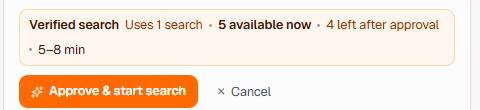
A verified search is the full SourcerPro run: brief understood, market searched, every candidate screened against your profile, ranked, with a market read. The approval screen always shows the cost and your remaining allowance before you start.
 Spending them well:
* **Refine, don't re-run.** [Refined runs](/en/sourcer/refining-a-search) and calibration sharpen an existing search; a new verified search is for a genuinely new role.
* **Front-load the brief.** A tight brief means the first run lands, which is the whole economy of the thing.
* **Check Smart Match first.** [Your own pool](/en/pipeline/smart-match) is free to search.
## Data credits
Data credits pay for contact lookups: **1 credit per revealed email or phone, charged only when something is found**. No result, no charge. The discipline that follows: reveal for candidates you'll actually approach — see [Sourcing responsibly](/en/sourcer/sourcing-responsibly).
Your current allowances are always visible in the app: searches on the approval screen, and your plan's totals under **Tenant Admin → Billing**.
Spending them well:
* **Refine, don't re-run.** [Refined runs](/en/sourcer/refining-a-search) and calibration sharpen an existing search; a new verified search is for a genuinely new role.
* **Front-load the brief.** A tight brief means the first run lands, which is the whole economy of the thing.
* **Check Smart Match first.** [Your own pool](/en/pipeline/smart-match) is free to search.
## Data credits
Data credits pay for contact lookups: **1 credit per revealed email or phone, charged only when something is found**. No result, no charge. The discipline that follows: reveal for candidates you'll actually approach — see [Sourcing responsibly](/en/sourcer/sourcing-responsibly).
Your current allowances are always visible in the app: searches on the approval screen, and your plan's totals under **Tenant Admin → Billing**.