> ## Documentation Index
> Fetch the complete documentation index at: https://support.yena.ai/llms.txt
> Use this file to discover all available pages before exploring further.
# The LinkedIn extension
> One click on a LinkedIn profile, one clean record in Yena — with dedupe alerts and direct pipeline assignment.
The Sourcer finds candidates you weren't looking at. The browser extension covers the opposite moment: you're **already on a LinkedIn profile** worth keeping.
## What one click does
Open a LinkedIn profile and hit **Save to Yena**. The extension captures the full profile — work history, education, contact information — and creates the candidate record. No copy-paste, no tab switching, no "I'll add them later" that never happens.
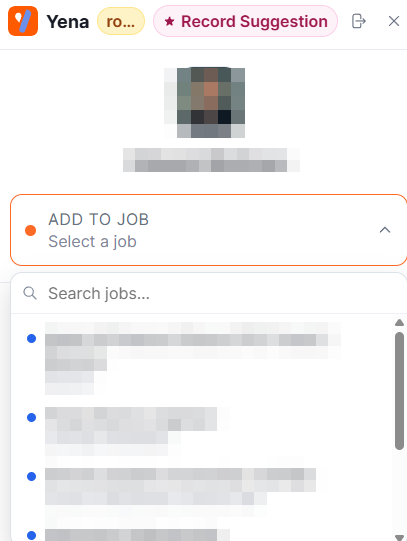 One click on any LinkedIn profile imports it. Yena's enrichment fills gaps automatically — verified emails and phone numbers where they can be found, plus experience, skills, and company context.
Already in your database? The extension alerts you on the spot, so double-entries stop at the source instead of surfacing months later. Duplicates merge cleanly.
Add the candidate straight onto a specific mandate and stage from the LinkedIn tab. The profile you found at 9:00 is on the [pipeline](/en/pipeline/stages-and-candidates) at 9:01.
## Extension and Sourcer, together
They're complementary motions: the [Sourcer](/en/getting-started/first-sourcer-run) sweeps a market from a brief; the extension harvests the profiles your own browsing surfaces — inbound applicants you look up, referrals, people who engaged with your posts. Both land in the same database, feed the same [Smart Match](/en/pipeline/smart-match), and grow the pool that answers first on the next mandate.
The extension works from the moment you sign up and install it — details on the [product page](https://www.yena.ai/products/linkedin-sourcing-extension). Save profiles with the same discipline you'd apply to any sourcing: see [Sourcing responsibly](/en/sourcer/sourcing-responsibly).
One click on any LinkedIn profile imports it. Yena's enrichment fills gaps automatically — verified emails and phone numbers where they can be found, plus experience, skills, and company context.
Already in your database? The extension alerts you on the spot, so double-entries stop at the source instead of surfacing months later. Duplicates merge cleanly.
Add the candidate straight onto a specific mandate and stage from the LinkedIn tab. The profile you found at 9:00 is on the [pipeline](/en/pipeline/stages-and-candidates) at 9:01.
## Extension and Sourcer, together
They're complementary motions: the [Sourcer](/en/getting-started/first-sourcer-run) sweeps a market from a brief; the extension harvests the profiles your own browsing surfaces — inbound applicants you look up, referrals, people who engaged with your posts. Both land in the same database, feed the same [Smart Match](/en/pipeline/smart-match), and grow the pool that answers first on the next mandate.
The extension works from the moment you sign up and install it — details on the [product page](https://www.yena.ai/products/linkedin-sourcing-extension). Save profiles with the same discipline you'd apply to any sourcing: see [Sourcing responsibly](/en/sourcer/sourcing-responsibly).