> ## Documentation Index
> Fetch the complete documentation index at: https://support.yena.ai/llms.txt
> Use this file to discover all available pages before exploring further.
# Presenting candidates: criteria, career rows and client decisions
> Shape what the client sees per job, compare candidates against your criteria with AI-backed suggestions, and collect richer decisions than yes/no.
A client meeting about a longlist lives or dies on one question: can the client see, at a glance, who fits and why. The portal answers it three ways — a career block on every candidate row, a criteria table in your own words, and decision options that match how reviews actually go.
## Control what the client sees — per job
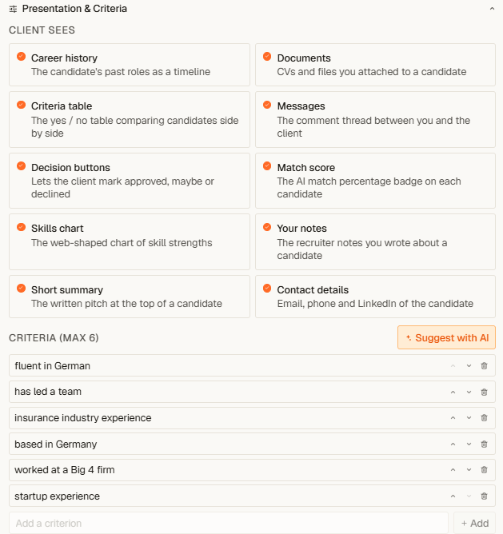
Every job's **Portal** tab has a **Presentation & Criteria** panel. Each block of the candidate page is a switch: career history, documents, the criteria table, match score, skills chart, your notes, contact details. What you switch off is enforced server-side — it never reaches the client's browser.
 ## The career block
Each candidate row in the client's list carries the last positions — period, company (with its logo where one is known), and role — the way a classic presentation report reads. The client compares careers side by side without opening a single profile. It follows the **Career history** switch, so one click hides it for engagements where less is more.
## Criteria in your words
Add up to six criteria per job — "Fluent German", "Has led an audit team", whatever this search turns on. For every candidate you set **yes / no / open** per criterion; the client sees the same table, candidate by candidate, and each verdict can carry a short reason written for their eyes. An honest question mark builds more trust than a silent guess — "open" is a first-class answer.
## Suggest with AI — with proof
**Suggest with AI** reads each candidate's profile — work history, summary, your recruiter notes — and pre-fills the table like a junior recruiter would:
* Where the profile states it outright, the suggestion quotes the exact sentence.
* Where an experienced recruiter would conclude it — someone based in Düsseldorf is not close to Hamburg — it says so and shows its reasoning.
* Where there is no basis, it stays quiet and tells you why.
Every suggestion is a draft until you confirm it. Nothing the AI writes reaches your client without your click, and hovering any suggested cell shows its evidence.
## Decisions beyond yes and no
Clients don't just approve and decline — they park people. Besides **Approve** and **Decline**, the portal offers **On hold** and **Waiting**. Parked candidates stay in the client's "To Review" list with a visible badge, every decision can be undone, and all of it lands back in your pipeline view the moment it happens.
Candidates can join the portal automatically: once a candidate reaches a presentation stage in your pipeline (Longlist or Shortlist by default — configurable under **Tenant Admin → Client Portal**), they appear in the job's portal without a second add. See [Sharing a shortlist](/en/portal/sharing-a-shortlist).
## The career block
Each candidate row in the client's list carries the last positions — period, company (with its logo where one is known), and role — the way a classic presentation report reads. The client compares careers side by side without opening a single profile. It follows the **Career history** switch, so one click hides it for engagements where less is more.
## Criteria in your words
Add up to six criteria per job — "Fluent German", "Has led an audit team", whatever this search turns on. For every candidate you set **yes / no / open** per criterion; the client sees the same table, candidate by candidate, and each verdict can carry a short reason written for their eyes. An honest question mark builds more trust than a silent guess — "open" is a first-class answer.
## Suggest with AI — with proof
**Suggest with AI** reads each candidate's profile — work history, summary, your recruiter notes — and pre-fills the table like a junior recruiter would:
* Where the profile states it outright, the suggestion quotes the exact sentence.
* Where an experienced recruiter would conclude it — someone based in Düsseldorf is not close to Hamburg — it says so and shows its reasoning.
* Where there is no basis, it stays quiet and tells you why.
Every suggestion is a draft until you confirm it. Nothing the AI writes reaches your client without your click, and hovering any suggested cell shows its evidence.
## Decisions beyond yes and no
Clients don't just approve and decline — they park people. Besides **Approve** and **Decline**, the portal offers **On hold** and **Waiting**. Parked candidates stay in the client's "To Review" list with a visible badge, every decision can be undone, and all of it lands back in your pipeline view the moment it happens.
Candidates can join the portal automatically: once a candidate reaches a presentation stage in your pipeline (Longlist or Shortlist by default — configurable under **Tenant Admin → Client Portal**), they appear in the job's portal without a second add. See [Sharing a shortlist](/en/portal/sharing-a-shortlist).