> ## Documentation Index
> Fetch the complete documentation index at: https://support.yena.ai/llms.txt
> Use this file to discover all available pages before exploring further.
# How candidates apply
> The public careers page and application form, and where applicants land in your pipeline.
Every job's [public links](/en/portal/public-links) include a careers page and a direct application link. Here is what the candidate sees and what happens next.
 ## The candidate side
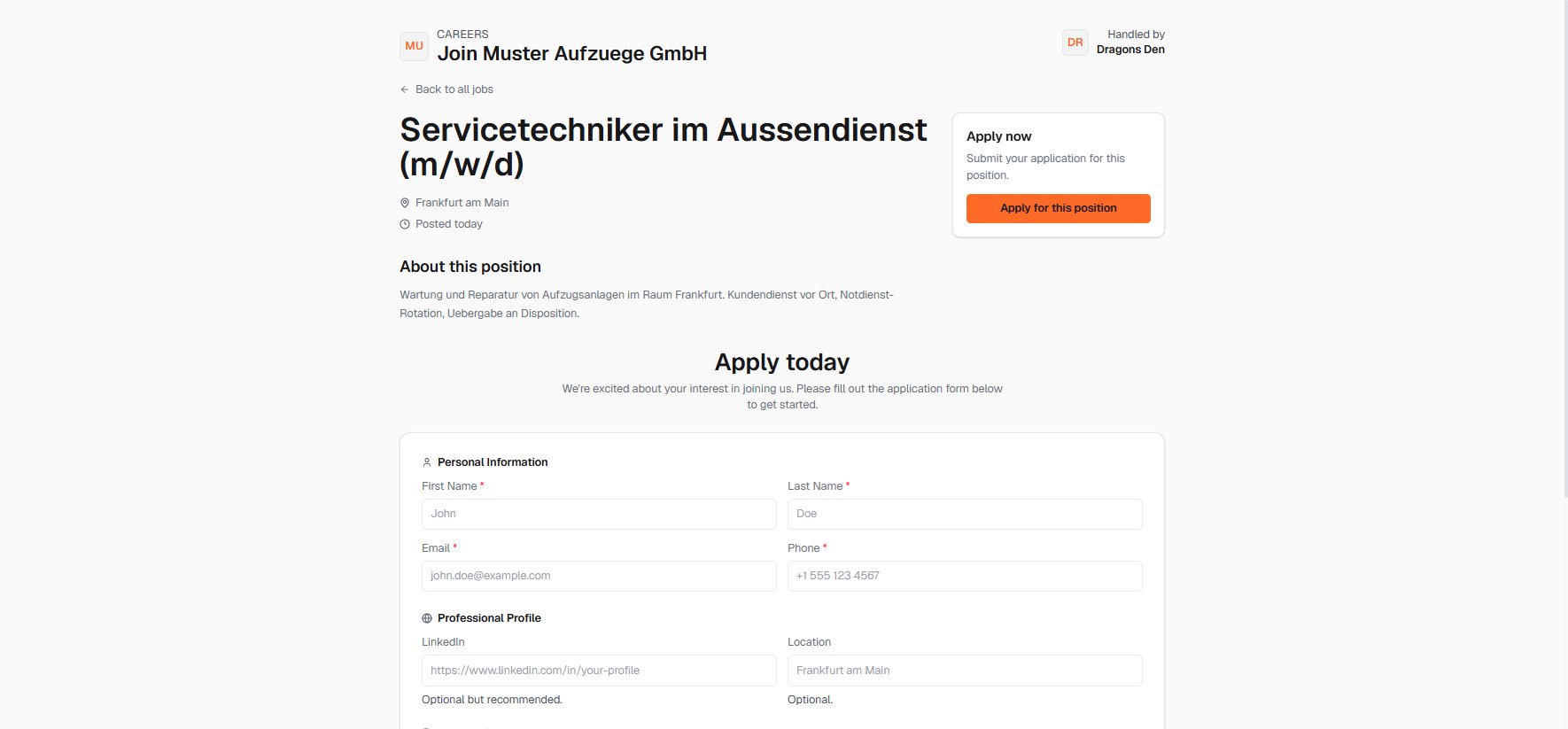
The careers page shows the role, location, and description under the client's name, with your agency credited as handling the search. The application form takes personal details, a LinkedIn profile, location, and documents; no account required.
## Your side
Applicants land in the job's pipeline, so applications and sourced candidates run through the same stages and the same review. The **Applied** counters on the pipeline and the jobs board show new arrivals.
If the client wants applications to come through their own website, give them the [embed snippet](/en/portal/public-links): the same form, served on their domain, feeding the same pipeline.
## The candidate side
The careers page shows the role, location, and description under the client's name, with your agency credited as handling the search. The application form takes personal details, a LinkedIn profile, location, and documents; no account required.
## Your side
Applicants land in the job's pipeline, so applications and sourced candidates run through the same stages and the same review. The **Applied** counters on the pipeline and the jobs board show new arrivals.
If the client wants applications to come through their own website, give them the [embed snippet](/en/portal/public-links): the same form, served on their domain, feeding the same pipeline.