> ## Documentation Index
> Fetch the complete documentation index at: https://support.yena.ai/llms.txt
> Use this file to discover all available pages before exploring further.
# Connect LinkedIn
> Connect one LinkedIn account to sync conversations and send LinkedIn outreach from Yena.
Connect LinkedIn in **Settings → Connected Accounts**. The account is private to your Yena user and becomes available in the Inbox and as a campaign sender.
 ## Before you start
* Use the LinkedIn account you want candidates and clients to hear from.
* Make sure you can sign in and complete any LinkedIn verification or two-factor prompt.
* If LinkedIn is already showing a restriction or warning, resolve it before enabling campaign sending.
## Connect LinkedIn
1. Open **Settings → Connected Accounts**.
2. Find **LinkedIn** and select **Connect**.
3. Complete the secure sign-in flow. If LinkedIn asks for verification, finish it in that window.
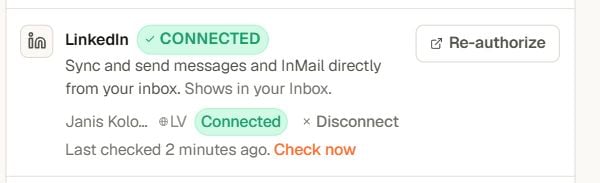
4. Return to Yena. The LinkedIn row should show a green **Connected** status and your account name.
5. Select **Check now** to confirm the connection is healthy.
## Where LinkedIn appears
* **Inbox** — sync conversations and send messages or InMail from Yena.
* **Campaigns** — choose the connected LinkedIn account as the sender for connection-request and message steps.
## How campaign follow-ups work
When a LinkedIn message follows a connection request, Yena waits until the invitation is accepted. The follow-up delay starts when Yena detects that acceptance, not when the invitation was sent.
Acceptance updates are automatic but not always instant. Yena checks before the follow-up is due and retries automatically if LinkedIn has not exposed the change yet.
## Re-authorize the account
Select **Re-authorize** when Yena reports an expired session, the account stops syncing, or LinkedIn requires you to sign in again. Re-authorizing refreshes the connection without changing your campaigns.
## Safe sending
* Turn sending on only for the campaign you are ready to run.
* If LinkedIn shows a warning, turn campaign sending off immediately and resolve the warning before retrying.
* Keep connection requests and follow-ups relevant, personalized, and within the limits shown in Yena.
## Troubleshooting
* **Connection looks stale:** select **Check now**.
* **Account is missing from a campaign:** confirm it is connected, then reopen the sequence and select it as the sender.
* **Messages are not syncing:** use **Re-authorize**, complete any LinkedIn verification, and check again.
## Before you start
* Use the LinkedIn account you want candidates and clients to hear from.
* Make sure you can sign in and complete any LinkedIn verification or two-factor prompt.
* If LinkedIn is already showing a restriction or warning, resolve it before enabling campaign sending.
## Connect LinkedIn
1. Open **Settings → Connected Accounts**.
2. Find **LinkedIn** and select **Connect**.
3. Complete the secure sign-in flow. If LinkedIn asks for verification, finish it in that window.
4. Return to Yena. The LinkedIn row should show a green **Connected** status and your account name.
5. Select **Check now** to confirm the connection is healthy.
## Where LinkedIn appears
* **Inbox** — sync conversations and send messages or InMail from Yena.
* **Campaigns** — choose the connected LinkedIn account as the sender for connection-request and message steps.
## How campaign follow-ups work
When a LinkedIn message follows a connection request, Yena waits until the invitation is accepted. The follow-up delay starts when Yena detects that acceptance, not when the invitation was sent.
Acceptance updates are automatic but not always instant. Yena checks before the follow-up is due and retries automatically if LinkedIn has not exposed the change yet.
## Re-authorize the account
Select **Re-authorize** when Yena reports an expired session, the account stops syncing, or LinkedIn requires you to sign in again. Re-authorizing refreshes the connection without changing your campaigns.
## Safe sending
* Turn sending on only for the campaign you are ready to run.
* If LinkedIn shows a warning, turn campaign sending off immediately and resolve the warning before retrying.
* Keep connection requests and follow-ups relevant, personalized, and within the limits shown in Yena.
## Troubleshooting
* **Connection looks stale:** select **Check now**.
* **Account is missing from a campaign:** confirm it is connected, then reopen the sequence and select it as the sender.
* **Messages are not syncing:** use **Re-authorize**, complete any LinkedIn verification, and check again.