> ## Documentation Index
> Fetch the complete documentation index at: https://support.yena.ai/llms.txt
> Use this file to discover all available pages before exploring further.
# Screening & knockout questions
> Ask the four questions that matter before the first call — work permit, notice period, salary, licence — and see disqualifying answers flagged, never auto-rejected.
An agency filling a field-sales role in Germany wastes its first call on the same four facts every time: work permit, driver's licence, notice period, salary expectation. Screening questions collect them inside the apply form, so the first conversation starts where it matters.
## Add questions to a job
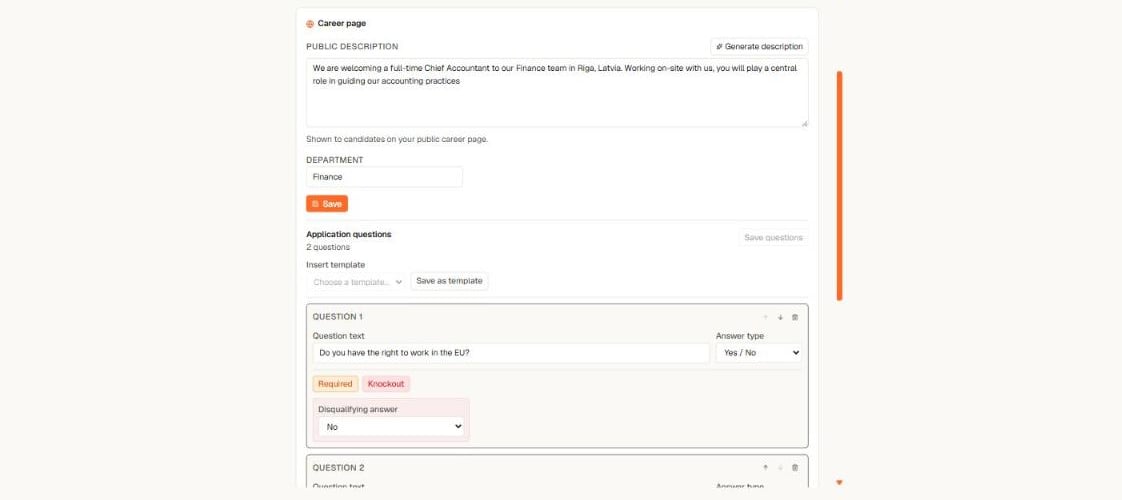 1. Open the job → **Details** tab → **Application questions**.
2. Select **Add question** and write the question text.
3. Pick an answer type: **Yes / No**, **single choice**, **short text**, or **number**.
4. Mark it **Required** if the candidate must answer to apply.
5. Select **Save questions**.
Candidates see the questions between their personal details and the CV upload. Answers are validated when the form is submitted and stored on the application.
## Knockout questions
A question can carry a **Knockout** flag with the disqualifying answer — for example *"Do you have the right to work in the EU?"* with **No** as disqualifying.
A knockout hit never rejects anyone automatically. The applicant still lands in your [inbound queue](/en/careers/inbound-applicants) with a quiet **Knockout** marker on the row — a person always makes the decision, and the respectful rejection is one click when they do. Short-text questions can never knock out.
## Reuse a set with templates
Ask the same things on every mandate? Save them once:
* **Save as template** stores the job's current questions under a name — for example "Standard DACH set".
* **Insert template** appends a saved set to any other job. Inserted questions are independent copies, so editing them on one job never changes another.
## What candidates experience
The questions render as part of the normal apply form — same design, same language. Required questions block submission until answered; everything else stays optional. Their answers appear on the application for your review, with yes/no shown as plain Yes or No.
1. Open the job → **Details** tab → **Application questions**.
2. Select **Add question** and write the question text.
3. Pick an answer type: **Yes / No**, **single choice**, **short text**, or **number**.
4. Mark it **Required** if the candidate must answer to apply.
5. Select **Save questions**.
Candidates see the questions between their personal details and the CV upload. Answers are validated when the form is submitted and stored on the application.
## Knockout questions
A question can carry a **Knockout** flag with the disqualifying answer — for example *"Do you have the right to work in the EU?"* with **No** as disqualifying.
A knockout hit never rejects anyone automatically. The applicant still lands in your [inbound queue](/en/careers/inbound-applicants) with a quiet **Knockout** marker on the row — a person always makes the decision, and the respectful rejection is one click when they do. Short-text questions can never knock out.
## Reuse a set with templates
Ask the same things on every mandate? Save them once:
* **Save as template** stores the job's current questions under a name — for example "Standard DACH set".
* **Insert template** appends a saved set to any other job. Inserted questions are independent copies, so editing them on one job never changes another.
## What candidates experience
The questions render as part of the normal apply form — same design, same language. Required questions block submission until answered; everything else stays optional. Their answers appear on the application for your review, with yes/no shown as plain Yes or No.