> ## Documentation Index
> Fetch the complete documentation index at: https://support.yena.ai/llms.txt
> Use this file to discover all available pages before exploring further.
# Show your open roles on your own website
> One copy-paste snippet puts your live job list into any website builder — WordPress, Wix, Squarespace, Webflow.
Most agencies already have a website — what is missing is a jobs section that updates itself. The embed snippet puts your live role list inside your own site: publish a job in Yena, and it appears on your website seconds later. No plugins, no developer.
## Copy the snippet
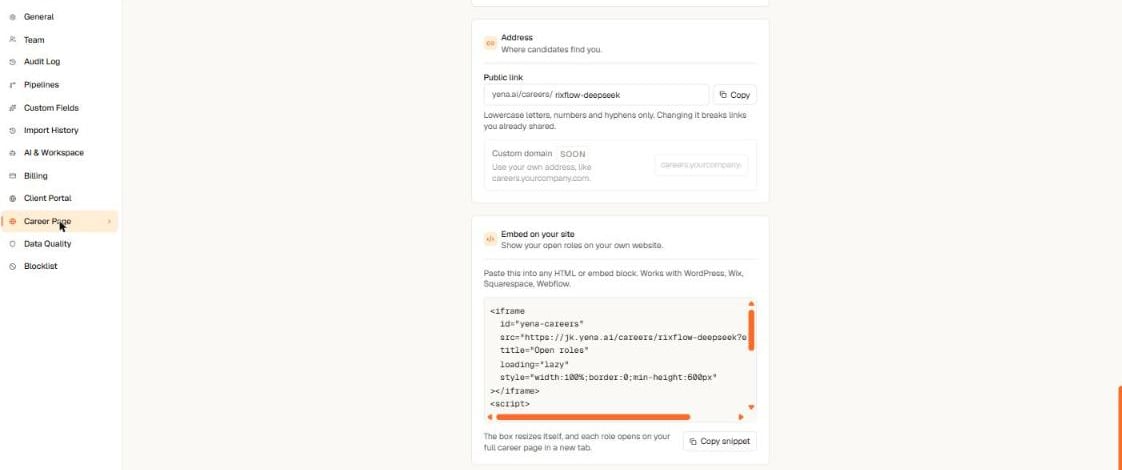 1. Open **Tenant Admin → Career Page** and scroll to **Embed on your site**.
2. Select **Copy snippet**.
3. In your website builder, add an **HTML** or **Embed** block and paste. That is all.
The box sizes itself to your job list and grows or shrinks as roles come and go. Each role opens on your full career page in a new tab, where candidates apply as usual.
## Where it works
Any builder that accepts an HTML block: WordPress, Wix, Squarespace, Webflow, and most others. The embedded view is a compact, jobs-only variant of your page — your site provides the story around it.
If you want candidates to see your full branded page instead, link straight to your public address from your site's navigation. The embed and the full page always show the same live roles.
1. Open **Tenant Admin → Career Page** and scroll to **Embed on your site**.
2. Select **Copy snippet**.
3. In your website builder, add an **HTML** or **Embed** block and paste. That is all.
The box sizes itself to your job list and grows or shrinks as roles come and go. Each role opens on your full career page in a new tab, where candidates apply as usual.
## Where it works
Any builder that accepts an HTML block: WordPress, Wix, Squarespace, Webflow, and most others. The embedded view is a compact, jobs-only variant of your page — your site provides the story around it.
If you want candidates to see your full branded page instead, link straight to your public address from your site's navigation. The embed and the full page always show the same live roles.