> ## Documentation Index
> Fetch the complete documentation index at: https://support.yena.ai/llms.txt
> Use this file to discover all available pages before exploring further.
# CV-first apply and "What we understood"
> Candidates upload their CV, the form fills itself, and Yena shows them what it understood — the application experience your clients will talk about.
Every recruiter knows the number that hurts: most people who open an application form never finish it. They are on a phone, the form wants fourteen fields they have already written down in their CV, and they close the tab. The strongest candidates are the ones with the least patience for it.
Yena turns the form around. The candidate drops their CV, the fields fill themselves, and — the part nobody else does — Yena tells them in plain words what it understood about them. Applying stops feeling like paperwork and starts feeling like being read.
## 1. The candidate uploads their CV
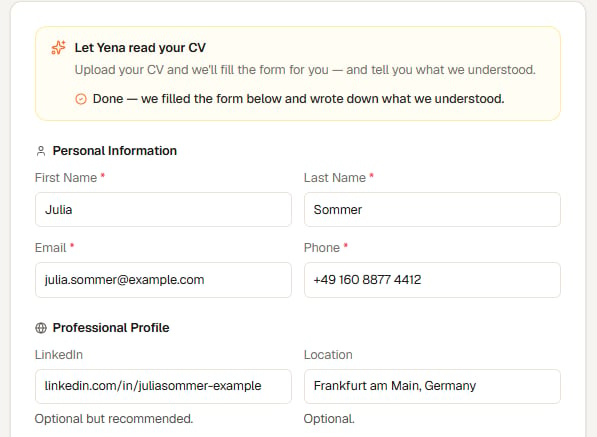 At the top of every apply form on your career page sits **Let Yena read your CV**. The candidate selects **Upload my CV**, and within a few seconds the form reports back: *Done — we filled the form below and wrote down what we understood.*
Name, email, phone, LinkedIn and location are filled in from the CV. Nothing is locked — the candidate reviews the fields and corrects anything that came out wrong, exactly as they would in any form.
Under the box is a quiet second line: *Or just fill the form in yourself — both work.* Nobody is forced through the AI path.
Accepted files are PDF, DOC, DOCX, ODT, RTF, TXT, JPG, JPEG and PNG, up to 5 MB each and up to five files.
## 2. Yena shows what it understood
At the top of every apply form on your career page sits **Let Yena read your CV**. The candidate selects **Upload my CV**, and within a few seconds the form reports back: *Done — we filled the form below and wrote down what we understood.*
Name, email, phone, LinkedIn and location are filled in from the CV. Nothing is locked — the candidate reviews the fields and corrects anything that came out wrong, exactly as they would in any form.
Under the box is a quiet second line: *Or just fill the form in yourself — both work.* Nobody is forced through the AI path.
Accepted files are PDF, DOC, DOCX, ODT, RTF, TXT, JPG, JPEG and PNG, up to 5 MB each and up to five files.
## 2. Yena shows what it understood
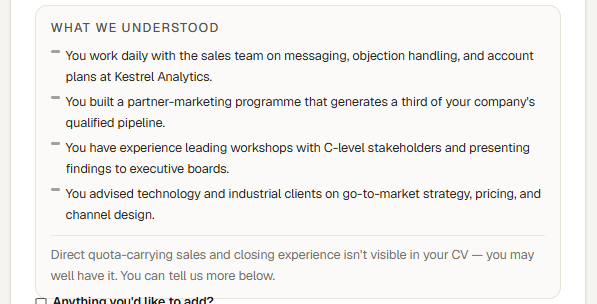 A calm **What we understood** card appears above the free-text box. It lists up to four strengths, written to the candidate in their own words and chosen for *this* role — not a generic CV summary.
The framing rules are deliberate, and they are worth knowing because they are the promise the page makes to every applicant:
* **Strengths first, always.** The card opens with what the person brings.
* **No scores, no percentages, no ranking.** Candidates are never shown a number about themselves.
* **At most one line about something not visible.** It sits below a divider, and it is phrased as an invitation — *"...isn't visible in your CV — you may well have it. You can tell us more below"* — never as a judgment and never as a rejection.
* That line points straight at the optional **Anything you'd like to add?** box directly beneath it, so a candidate who has the missing experience can simply say so.
The card never rejects anybody and never decides anything. It exists so the candidate can see they were read properly — and so that anything their CV failed to say gets one more chance to be said.
## 3. The rest of the application
Below the card, the application continues as normal: the free-text note, any [screening questions](/en/careers/screening-questions) you added to the role, the CV and documents, and the privacy consent.
After submitting, the candidate confirms by email. Only confirmed applications reach your [inbound queue](/en/careers/inbound-applicants), and they arrive as fully parsed candidate profiles.
## What recruiters should know
* **An application is never blocked on AI.** If the parse is slow or fails, the form behaves exactly like an ordinary application form and the candidate applies as usual. The AI step is an upgrade, never a gate.
* **Nothing is stored until they submit.** The parse used to fill the form is not kept for candidates who change their mind and close the tab.
* **You see what they saw.** The reflection shown to the candidate is saved with their application, so when you open it later you are reading the same words they read.
This is the part of the flow worth showing a client. "Your applicants do not fill in forms, and they are told what we understood about them" is a concrete quality difference, and it costs your team nothing to deliver.
## Next steps
* [Add screening questions to the apply form](/en/careers/screening-questions)
* [Review applicants in the inbound queue](/en/careers/inbound-applicants)
* [The candidate status link](/en/careers/candidate-status-link)
A calm **What we understood** card appears above the free-text box. It lists up to four strengths, written to the candidate in their own words and chosen for *this* role — not a generic CV summary.
The framing rules are deliberate, and they are worth knowing because they are the promise the page makes to every applicant:
* **Strengths first, always.** The card opens with what the person brings.
* **No scores, no percentages, no ranking.** Candidates are never shown a number about themselves.
* **At most one line about something not visible.** It sits below a divider, and it is phrased as an invitation — *"...isn't visible in your CV — you may well have it. You can tell us more below"* — never as a judgment and never as a rejection.
* That line points straight at the optional **Anything you'd like to add?** box directly beneath it, so a candidate who has the missing experience can simply say so.
The card never rejects anybody and never decides anything. It exists so the candidate can see they were read properly — and so that anything their CV failed to say gets one more chance to be said.
## 3. The rest of the application
Below the card, the application continues as normal: the free-text note, any [screening questions](/en/careers/screening-questions) you added to the role, the CV and documents, and the privacy consent.
After submitting, the candidate confirms by email. Only confirmed applications reach your [inbound queue](/en/careers/inbound-applicants), and they arrive as fully parsed candidate profiles.
## What recruiters should know
* **An application is never blocked on AI.** If the parse is slow or fails, the form behaves exactly like an ordinary application form and the candidate applies as usual. The AI step is an upgrade, never a gate.
* **Nothing is stored until they submit.** The parse used to fill the form is not kept for candidates who change their mind and close the tab.
* **You see what they saw.** The reflection shown to the candidate is saved with their application, so when you open it later you are reading the same words they read.
This is the part of the flow worth showing a client. "Your applicants do not fill in forms, and they are told what we understood about them" is a concrete quality difference, and it costs your team nothing to deliver.
## Next steps
* [Add screening questions to the apply form](/en/careers/screening-questions)
* [Review applicants in the inbound queue](/en/careers/inbound-applicants)
* [The candidate status link](/en/careers/candidate-status-link)