> ## Documentation Index
> Fetch the complete documentation index at: https://support.yena.ai/llms.txt
> Use this file to discover all available pages before exploring further.
# Review who goes out, then start or pause
> See exactly who gets the next message on the campaign Overview, then start sending, pause instantly, and resume without anyone starting over.
## Why this matters
Before 200 candidates get a message, you want to see exactly who goes first and when. The campaign **Overview** is the one place to start: it shows how the campaign is doing, who is queued for the next sends, and when each message goes out. You check it, then you decide.
While the campaign runs, the same page answers the three questions you actually have: is it working, is it waiting, and who is next. If something looks wrong, you stop it instantly with one click.
## What the Overview shows
Every campaign has four tabs: **Overview**, **People**, **Sequence** and **Settings**. A campaign that has people opens on **Overview**; one without people opens on **People**. Everything below sits on the **Overview** tab, from top to bottom.
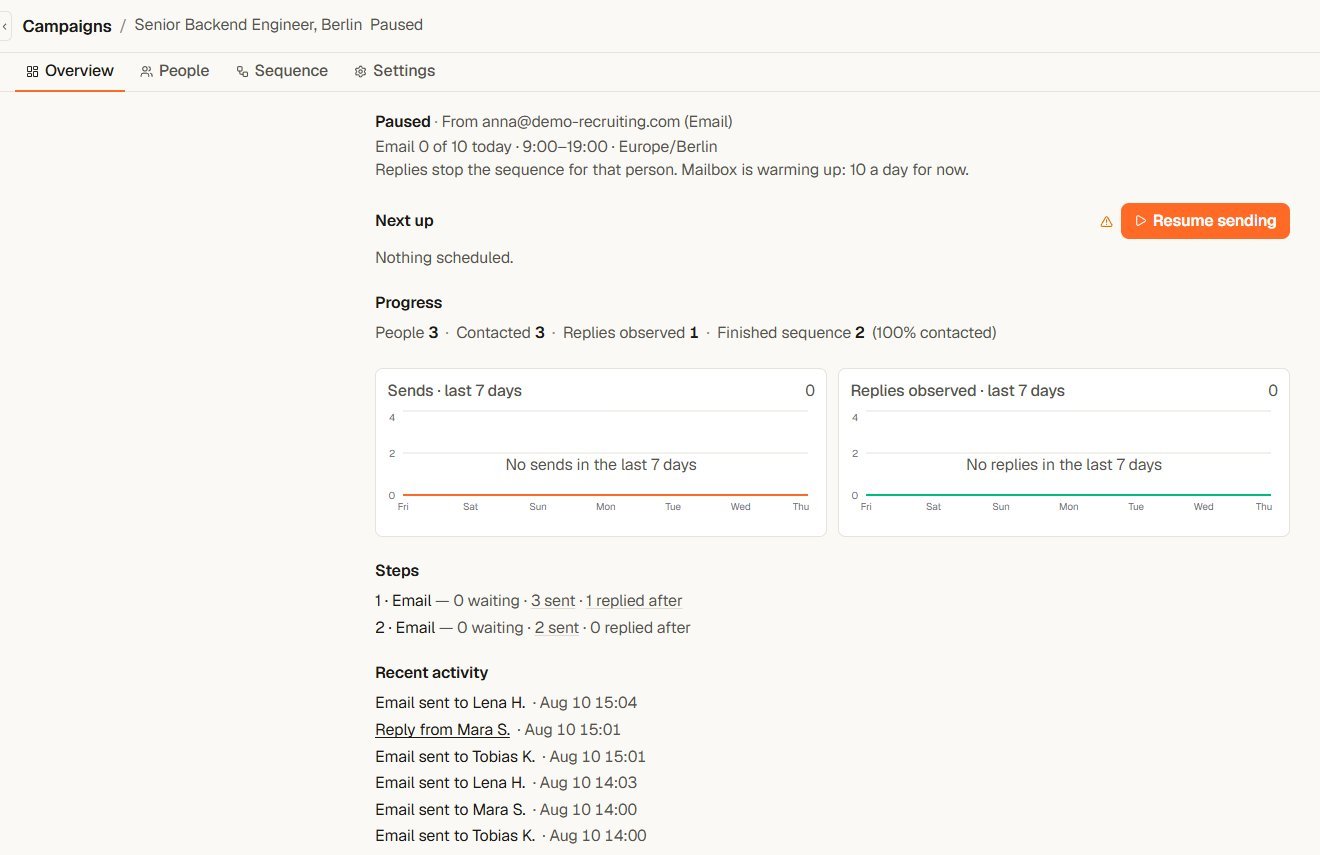 **The state line.** One status word, the same word the Campaigns list and the page header show: **Draft**, **Active**, **Paused**, **Needs attention**, **Completed** or **Archived**. Next to it you see who sends (for example "From [anna@demo-recruiting.com](mailto:anna@demo-recruiting.com) (Email)"), today's allowance per channel ("Email 0 of 10 today"), and your delivery window with its timezone ("9:00–19:00 · Europe/Berlin").
**The grey lines under it.** Up to three plain sentences, depending on the campaign:
* "Replies stop the sequence for that person." Always shown.
* "Unanswered invitations are withdrawn after 21 days." Only when the sequence has a LinkedIn connection request. The number is your campaign's setting.
* "Mailbox is warming up: 10 a day for now." Only while a newly connected mailbox is ramping up. See [Sending limits and account safety](/en/campaigns/sending-limits-and-safety).
**Next up.** The people the next sends go to. Each row shows the step, the sender and the time: "Today 09:00", "Tomorrow 09:00" or "Due now". "Due now" only appears when sending is on, the delivery window is open and allowance is left. Every row has a remove button. It asks "Remove from campaign?" and takes the person out before anything is sent to them. When nobody is queued, you see "Nothing scheduled."
**Before the first start.** For a campaign that has never sent, **Next up** shows "This is what will go out when you start:" with an estimate marked "Estimate · timing may change". The estimate is built from your delivery window and daily limits. Do-not-contact rules are still checked at the moment of sending.
**Held.** People whose next step cannot go out right now, each with the reason in one line. This is where you look when someone is not moving.
**Start or pause.** The **Start sending** button lives only here, under **Next up**. If the campaign has sent before, it reads **Resume sending**. While sending is on, the Overview shows "Sending is on." and a **Pause sending** button.
Below that come the campaign numbers: progress, the last 7 days, the steps and recent activity. See [Track progress and replies](/en/campaigns/track-progress-and-replies).
## Start sending
Go to **Campaigns** and open the campaign. If it has people, it opens on **Overview**.
Read **Next up**. Each row names the step, the sender and the time. If someone should not get a message, use the remove button on their row. It takes them out before anything is sent.
If the button is greyed out, hover it to see why. The line under the button names the fix with a link, for example "Select a sender on step 1. Open the sequence".
A confirmation names how many people will start. Confirm it, and Yena works through the sequence inside your delivery window.
Daily limits and the delivery window decide when queued sends actually go out. New to campaigns? The full walkthrough is in [Run a campaign from setup to replies](/en/campaigns/run-a-campaign).
## Pause and resume
There are two places to stop, and both take effect immediately:
* On the **Overview**, select **Pause sending**.
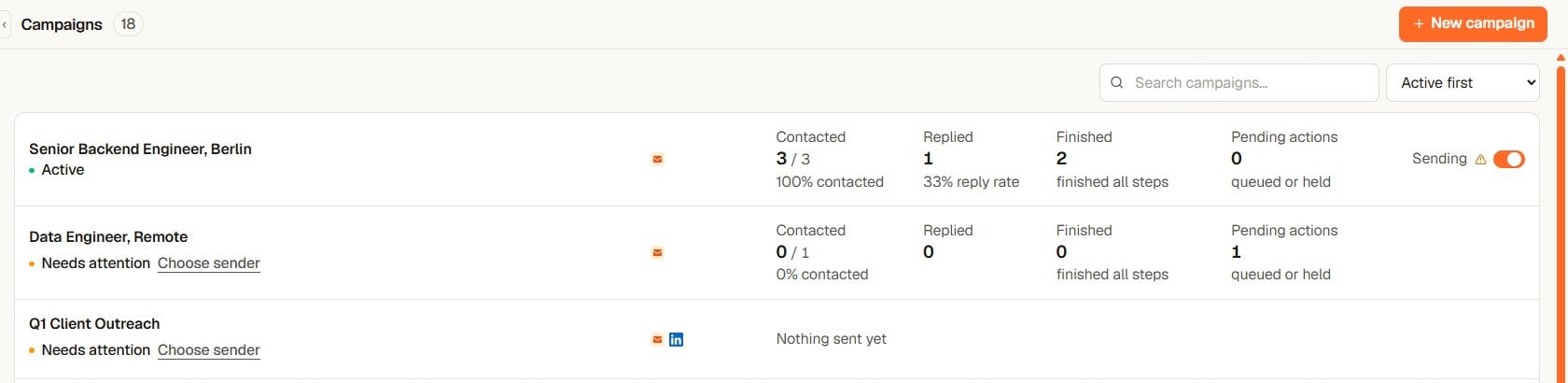
* On the Campaigns page, switch **Sending** off in the campaign's row. This switch can only pause: one click, no dialog, and a message confirms "Automatic sending is off". The row then shows **Paused** and a **Start** link that opens the Overview.
**The state line.** One status word, the same word the Campaigns list and the page header show: **Draft**, **Active**, **Paused**, **Needs attention**, **Completed** or **Archived**. Next to it you see who sends (for example "From [anna@demo-recruiting.com](mailto:anna@demo-recruiting.com) (Email)"), today's allowance per channel ("Email 0 of 10 today"), and your delivery window with its timezone ("9:00–19:00 · Europe/Berlin").
**The grey lines under it.** Up to three plain sentences, depending on the campaign:
* "Replies stop the sequence for that person." Always shown.
* "Unanswered invitations are withdrawn after 21 days." Only when the sequence has a LinkedIn connection request. The number is your campaign's setting.
* "Mailbox is warming up: 10 a day for now." Only while a newly connected mailbox is ramping up. See [Sending limits and account safety](/en/campaigns/sending-limits-and-safety).
**Next up.** The people the next sends go to. Each row shows the step, the sender and the time: "Today 09:00", "Tomorrow 09:00" or "Due now". "Due now" only appears when sending is on, the delivery window is open and allowance is left. Every row has a remove button. It asks "Remove from campaign?" and takes the person out before anything is sent to them. When nobody is queued, you see "Nothing scheduled."
**Before the first start.** For a campaign that has never sent, **Next up** shows "This is what will go out when you start:" with an estimate marked "Estimate · timing may change". The estimate is built from your delivery window and daily limits. Do-not-contact rules are still checked at the moment of sending.
**Held.** People whose next step cannot go out right now, each with the reason in one line. This is where you look when someone is not moving.
**Start or pause.** The **Start sending** button lives only here, under **Next up**. If the campaign has sent before, it reads **Resume sending**. While sending is on, the Overview shows "Sending is on." and a **Pause sending** button.
Below that come the campaign numbers: progress, the last 7 days, the steps and recent activity. See [Track progress and replies](/en/campaigns/track-progress-and-replies).
## Start sending
Go to **Campaigns** and open the campaign. If it has people, it opens on **Overview**.
Read **Next up**. Each row names the step, the sender and the time. If someone should not get a message, use the remove button on their row. It takes them out before anything is sent.
If the button is greyed out, hover it to see why. The line under the button names the fix with a link, for example "Select a sender on step 1. Open the sequence".
A confirmation names how many people will start. Confirm it, and Yena works through the sequence inside your delivery window.
Daily limits and the delivery window decide when queued sends actually go out. New to campaigns? The full walkthrough is in [Run a campaign from setup to replies](/en/campaigns/run-a-campaign).
## Pause and resume
There are two places to stop, and both take effect immediately:
* On the **Overview**, select **Pause sending**.
* On the Campaigns page, switch **Sending** off in the campaign's row. This switch can only pause: one click, no dialog, and a message confirms "Automatic sending is off". The row then shows **Paused** and a **Start** link that opens the Overview.
 Messages and invitations that already went out cannot be recalled.
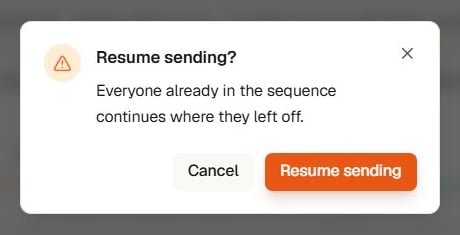
To start again, open the campaign's **Overview** and select **Resume sending**. The dialog counts only people who are new since the last run. Everyone else continues where they left off. Nobody restarts from step 1, and people who replied or finished are never enrolled again.
Messages and invitations that already went out cannot be recalled.
To start again, open the campaign's **Overview** and select **Resume sending**. The dialog counts only people who are new since the last run. Everyone else continues where they left off. Nobody restarts from step 1, and people who replied or finished are never enrolled again.
 ## Completed and archived campaigns
In the **Settings** tab, setting **Status** to **Completed** or **Archived** and selecting **Save Changes** also turns sending off. Setting the status back to **Active** does not restart sending: the campaign shows **Paused**, and you resume on the **Overview**.
A completed campaign shows "Make the campaign active." under a greyed-out **Resume sending** button. Change the status first, then resume.
## Troubleshooting
* **Start sending is greyed out:** hover it. The line under it names the missing item and links to the place to fix it.
* **Nothing scheduled:** nobody is queued for the next sends. Check that the campaign has people and the sequence has steps.
* **People sit under Held:** each entry names the reason in one line. Fix that reason, or remove the person from the campaign.
* **The state line says Needs attention:** something in the setup is missing. The line under the greyed-out button names it and links to the place to fix it.
* **You paused by mistake:** open the **Overview** and select **Resume sending**. Everyone continues where they left off.
## Completed and archived campaigns
In the **Settings** tab, setting **Status** to **Completed** or **Archived** and selecting **Save Changes** also turns sending off. Setting the status back to **Active** does not restart sending: the campaign shows **Paused**, and you resume on the **Overview**.
A completed campaign shows "Make the campaign active." under a greyed-out **Resume sending** button. Change the status first, then resume.
## Troubleshooting
* **Start sending is greyed out:** hover it. The line under it names the missing item and links to the place to fix it.
* **Nothing scheduled:** nobody is queued for the next sends. Check that the campaign has people and the sequence has steps.
* **People sit under Held:** each entry names the reason in one line. Fix that reason, or remove the person from the campaign.
* **The state line says Needs attention:** something in the setup is missing. The line under the greyed-out button names it and links to the place to fix it.
* **You paused by mistake:** open the **Overview** and select **Resume sending**. Everyone continues where they left off.