> ## Documentation Index
> Fetch the complete documentation index at: https://support.yena.ai/llms.txt
> Use this file to discover all available pages before exploring further.
# Build your sequence
> Step types, timing, personalization, and the rules that keep a sequence safe to run.
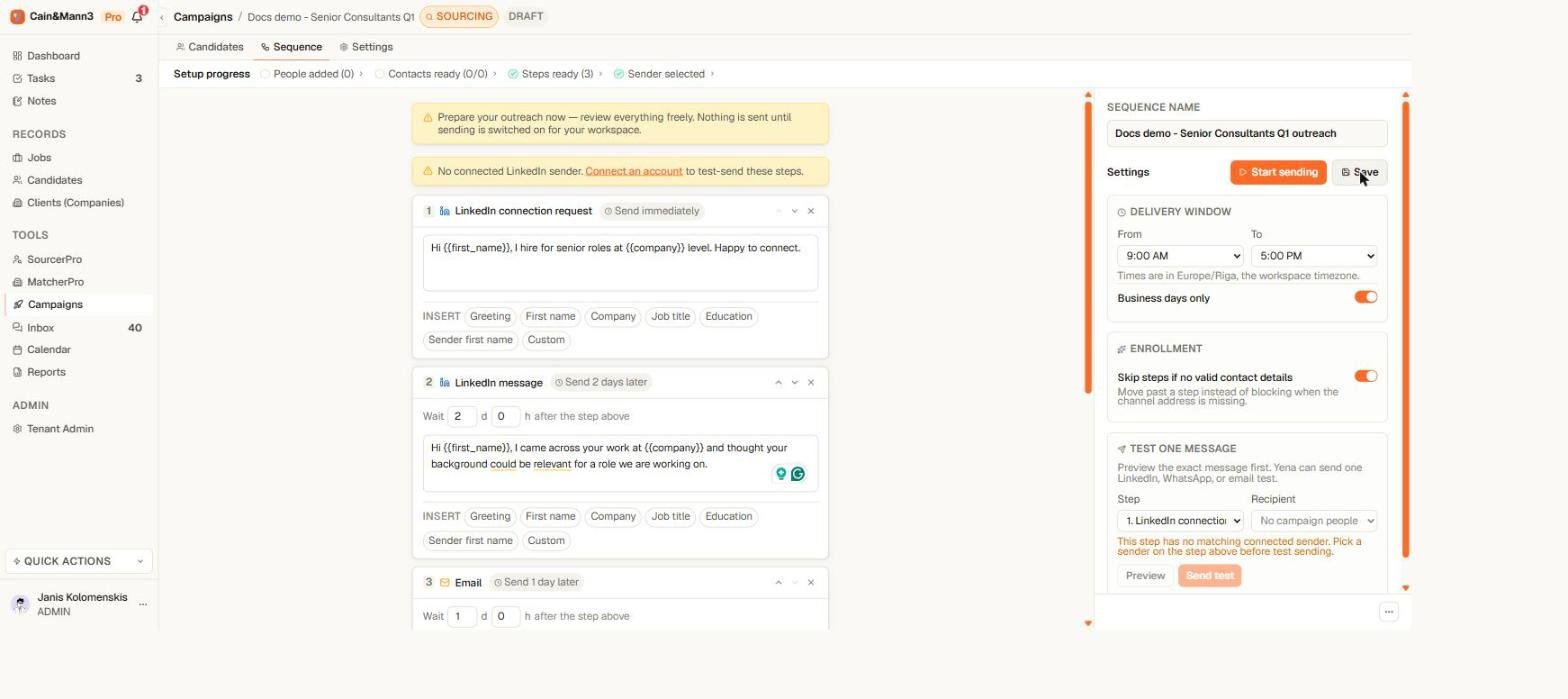
Every campaign has exactly one sequence. It is created with the campaign, carries its name, and owns all the outreach — so there is never a question of which sequence a person is on.
 ## Step types
| Step | What Yena does |
| ------------------------------- | -------------------------------------------------------------------------------------------------------------------------------------------------- |
| **Email** | Sends from your connected account, with your saved signature appended. |
| **LinkedIn connection request** | Invites the person to connect. The note is optional. Only one per sequence. |
| **LinkedIn message** | Sends once you are connected. After a connection request, the delay counts from the moment the person accepts — not from when the invite was sent. |
| **WhatsApp message** | Sends to people with a WhatsApp number. |
| **Task / Call** | A reminder for you. Yena never performs these automatically. |
## Timing
Each step header states its timing in plain words: **Send immediately** or **Send 3 days later**. Open the step to change the days and hours.
The delay counts from the previous step. For a LinkedIn message that follows a connection request, it counts from acceptance — so "2 days later" means two days after they accepted, however long the invite sat unanswered.
## Personalization
Insert fields like **First name**, **Company**, **Job title**, and **Sender first name** anywhere in a subject or body. Before launching, use **Test one message** to see a real rendered result for a real recipient.
Write the message you would write to one person, then swap the specifics for fields. If a sentence only works with a field filled in, check with the preview how it reads for someone whose profile is missing that detail.
## Rules the editor enforces
* **One sequence per campaign, one connection request per sequence.** More than one invite to the same person reads as spam — to the recipient and to LinkedIn.
* **Email steps need a subject and a body; LinkedIn messages need a body.** The readiness check names any step that is incomplete.
* **Every step needs a sender it can use.** Each sending step is tied to one of your connected accounts; the readiness check flags any step without one.
* **Sending on means editing off.** While **Activate sending** is on, the sequence is read-only. Pause first, edit, preview, then resume — people mid-journey continue safely on the updated definition.
## Templates
The sequence editor includes ready-made templates for common outreach patterns. Applying one fills in the steps immediately; everything stays editable.
## Missing contact details
A person without an email address cannot receive an email step; a person without a LinkedIn profile cannot receive LinkedIn steps. In the sequence settings you decide what happens:
* **Skip** — the person skips that step and continues with the rest of their journey.
* **Hold** — the person waits until you add the missing detail.
Missing details never block the campaign as a whole — only that person's step.
## Step types
| Step | What Yena does |
| ------------------------------- | -------------------------------------------------------------------------------------------------------------------------------------------------- |
| **Email** | Sends from your connected account, with your saved signature appended. |
| **LinkedIn connection request** | Invites the person to connect. The note is optional. Only one per sequence. |
| **LinkedIn message** | Sends once you are connected. After a connection request, the delay counts from the moment the person accepts — not from when the invite was sent. |
| **WhatsApp message** | Sends to people with a WhatsApp number. |
| **Task / Call** | A reminder for you. Yena never performs these automatically. |
## Timing
Each step header states its timing in plain words: **Send immediately** or **Send 3 days later**. Open the step to change the days and hours.
The delay counts from the previous step. For a LinkedIn message that follows a connection request, it counts from acceptance — so "2 days later" means two days after they accepted, however long the invite sat unanswered.
## Personalization
Insert fields like **First name**, **Company**, **Job title**, and **Sender first name** anywhere in a subject or body. Before launching, use **Test one message** to see a real rendered result for a real recipient.
Write the message you would write to one person, then swap the specifics for fields. If a sentence only works with a field filled in, check with the preview how it reads for someone whose profile is missing that detail.
## Rules the editor enforces
* **One sequence per campaign, one connection request per sequence.** More than one invite to the same person reads as spam — to the recipient and to LinkedIn.
* **Email steps need a subject and a body; LinkedIn messages need a body.** The readiness check names any step that is incomplete.
* **Every step needs a sender it can use.** Each sending step is tied to one of your connected accounts; the readiness check flags any step without one.
* **Sending on means editing off.** While **Activate sending** is on, the sequence is read-only. Pause first, edit, preview, then resume — people mid-journey continue safely on the updated definition.
## Templates
The sequence editor includes ready-made templates for common outreach patterns. Applying one fills in the steps immediately; everything stays editable.
## Missing contact details
A person without an email address cannot receive an email step; a person without a LinkedIn profile cannot receive LinkedIn steps. In the sequence settings you decide what happens:
* **Skip** — the person skips that step and continues with the rest of their journey.
* **Hold** — the person waits until you add the missing detail.
Missing details never block the campaign as a whole — only that person's step.